TrendClipGen

Turn your photos into trending dance, rap and pet videos from ready-made templates

Beginner
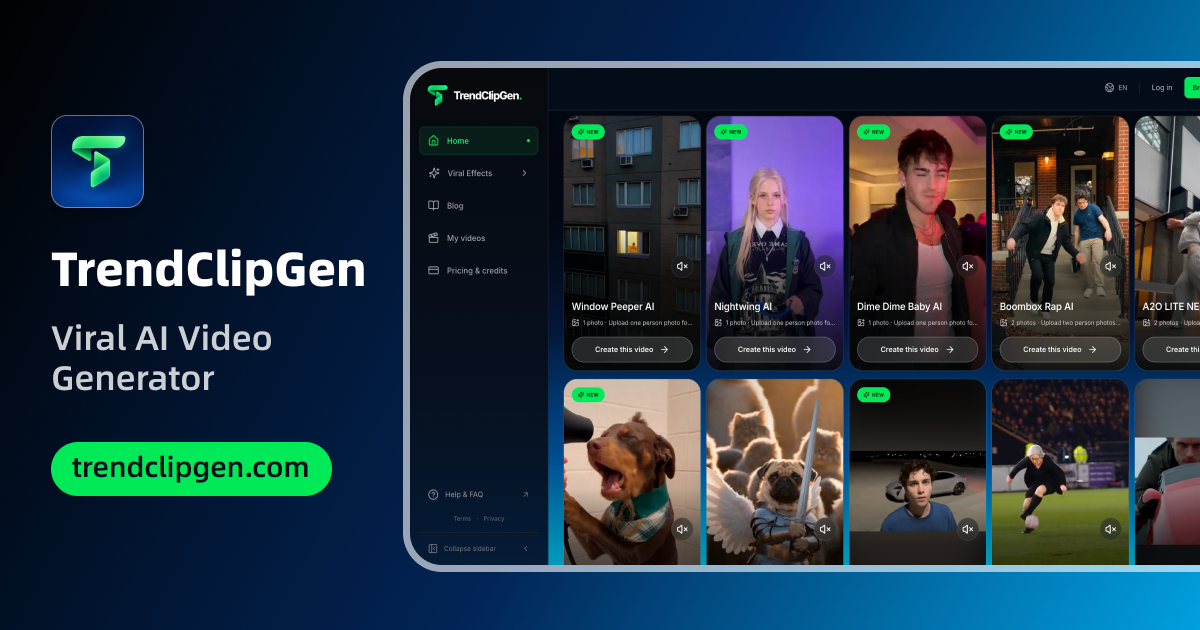
Screenshot of TrendClipGen, Turn your photos into trending dance, rap and pet videos from ready-made templates

What is TrendClipGen?

TrendClipGen is a dance generator tool that turns your photos into trending dance, rap and pet videos from ready-made templates. TrendClipGen is a web tool that turns one to three uploaded photos into recreations of trending videos and styled images.

TrendClipGen is a browser-based generator that places people, friends or pets into recreations of videos that are currently circulating on social platforms. Instead of writing a prompt, the user chooses a template from a gallery, uploads the number of photos that template asks for, and receives a finished clip built around those faces. The approach trades open-ended control for speed and predictability: the scene, the choreography and the mood are already decided, and the uploaded photo supplies the subject. The video gallery is sorted into groups such as Dance, Rap, Pets, Duos and groups, and Fantasy. Each card states how many photos it needs, usually one, two or three, and describes the scene in a sentence: a solo dance through colorful rooms, a ranch rap duet, a kitchen comedy bit, a night-time kitten parade led by a pet photo. Newer templates carry a NEW tag, and many are named after the songs or memes they imitate. A separate image section works the same way for stills, with looks grouped under Portraits, Couples and Friends, Pets and Holiday, including flash-camera styles, a Christmas photoshoot and a younger-self hug. The audience is mainly casual creators, pet owners and people who want something to post when a meme is at its peak, rather than editors who need timelines, scripts or custom camera control. Because every template is its own landing page, the catalog is also easy to browse for a specific trend by name. Among alternatives, general text-to-video and image-to-video generators offer far more freedom but demand prompting skill and iteration. Template-driven tools in the same space narrow that to a pick-and-upload flow, and TrendClipGen sits firmly at that simple end. The homepage does not describe pricing, export options, commercial rights or consent handling for uploaded faces, so those points need checking on the site before any serious use.
How do you use TrendClipGen?

  1. 1Browse the viral video gallery
    Open the homepage and scroll the template gallery. Filter by All, Dance, Rap, Pets, Duos and groups or Fantasy to find a trend you like.
  2. 2Check how many photos a template needs
    Each card lists its photo count, from one to three. The full catalog is on the video effects page if the homepage selection is not enough.
  3. 3Open a template and upload your photos
    Click Create your own on a template, then add clear photos of yourself, friends or a pet. Multi-person templates such as No Scrubs AI ask for several separate photos.
  4. 4Generate and review the clip
    Start the generation and wait for the video to render. Check that faces and motion look right, and try another photo if the result is off.
  5. 5Try a still image look instead
    For pictures rather than video, use the image creator and choose a style such as a flash-camera portrait or a Christmas photoshoot.

Pros and cons

Pros

  • No prompt writing: pick a template, upload photos and get a finished clipAI
  • Large gallery of trend-based templates grouped by dance, rap, pets, duos and fantasyAI
  • Each template states its photo count up front, so requirements are clear before uploadingAI
  • Supports pets and groups as well as solo portraitsAI
  • Also offers an image section with portrait, couple, pet and holiday looksAI

Cons

  • Output is bound to preset templates, so custom scenes, scripts and camera control are not possibleAI
  • Homepage shows no pricing, credit limits or free tier detailsAI
  • Trend templates date quickly, and many imitate specific songs or celebrity moments, which may raise rights concernsAI
  • No stated information on export formats, resolution, commercial use or how uploaded faces are handledAI

How much does TrendClipGen cost?

Features

Template-based photo-to-video generation in Dance, Rap, Pets, Duos and groups, and Fantasy groups, using one to three photos per clip. A separate image creator offers styled looks for portraits, couples and friends, pets and holidays. No prompts needed.

Learn more

Frequently asked questions about TrendClipGen

  • How do you use TrendClipGen?
    The walkthrough on this page covers 5 steps: 1. Browse the viral video gallery 2. Check how many photos a template needs 3. Open a template and upload your photos 4. Generate and review the clip 5. Try a still image look instead.
  • What platforms does TrendClipGen support?
    TrendClipGen is available on Web App.
  • What are the limitations of TrendClipGen?
    Output is bound to preset templates, so custom scenes, scripts and camera control are not possible. Homepage shows no pricing, credit limits or free tier details. Trend templates date quickly, and many imitate specific songs or celebrity moments, which may raise rights concerns.

Status

StatusActive
Views0
Outbound clicks0
Added11/18/2026

Platforms

Web App

Pricing

Freemium