Integrations
No formal integrations are described. The extension operates on text fields in websites such as Facebook, Twitter, LinkedIn, YouTube and Gmail, and installs from the Chrome Web Store.
Grammar fixes and writing polish in any web text box
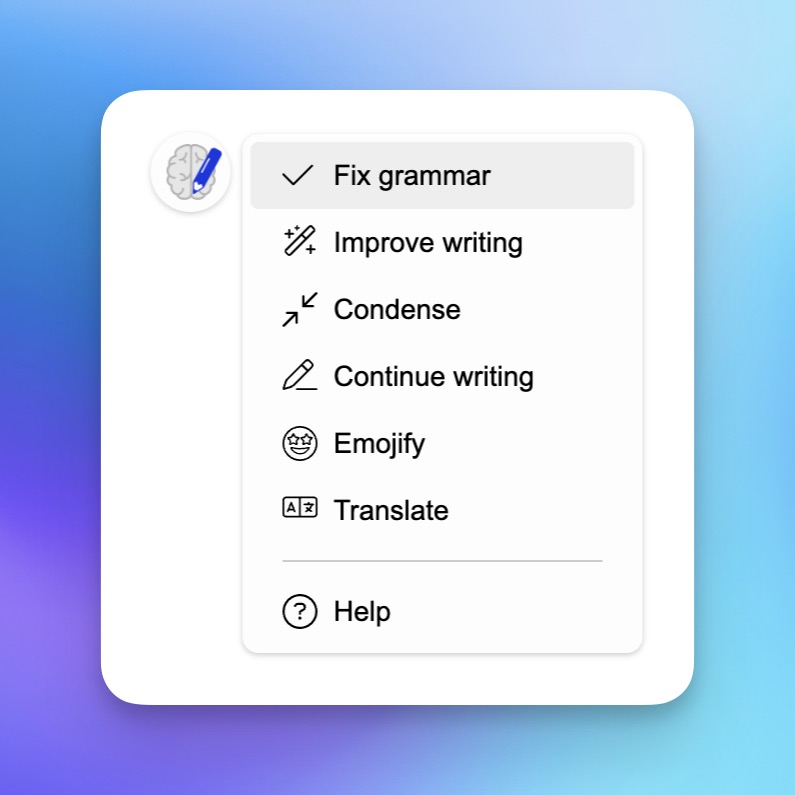
Write Brain is a grammar checker tool. A Chrome extension that corrects grammar, tightens wordy sentences, enriches plain drafts, translates selected text, and suggests emoji, all directly inside text boxes on websites like Gmail, LinkedIn and YouTube.
Write Brain is a browser extension that runs a grammar checker and a set of rewriting tools inside any text field on the web. The premise is that most writing now happens in places that are not a word processor: a LinkedIn post, a Gmail draft, a YouTube comment, a support reply. Instead of copying text into a separate editor and pasting it back, the extension sits on the page and acts on the text you have already selected or typed. The core function is one click correction of typos and grammar mistakes, aimed at people who type quickly and would otherwise chase errors one at a time before pressing send. On top of that it offers rewrites with a different intent: stripping out verbosity and corporate phrasing to leave a shorter, plainer message, condensing a rambling draft into a concise version, and dressing up a bare outline with more descriptive language. A translation feature works on selected text, so a foreign language comment or a support email in another language can be read in your own language, and a reply can be converted into the recipient's language before it is sent. A lighter feature suggests emoji for the end of a paragraph or as bullets for a list. It is built for frequent, short form communicators rather than long form authors: social media managers, sales and support staff working in web inboxes, community managers reading comments across languages, and anyone who wants their everyday posts and emails to read more cleanly. The workflow is selection based, so the tool is only as useful as the habit of highlighting text and invoking it. The obvious comparison is with full grammar platforms and AI writing assistants that offer a broader editor, brand voice controls, and document level review. Write Brain competes on placement and speed: it lives where you type and demands very little setup. The trade off is that it is a lightweight layer on top of whatever page you are on, so anyone needing deep style guides, team admin, or long document workflows will likely outgrow it.
No formal integrations are described. The extension operates on text fields in websites such as Facebook, Twitter, LinkedIn, YouTube and Gmail, and installs from the Chrome Web Store.
One click grammar and typo correction, a verbosity remover for cutting fluff, a condense mode that shortens rambling drafts, descriptive rewriting for bare outlines, translation of selected text and of drafted replies, and emoji suggestions for paragraph endings and list bullets, all applied inside text fields on websites.
 AI Angels400+ customizable AI girlfriends for NSFW chat, voice calls, and roleplay
 Candy AIExperience the future of companionship with AI friends who chat, role-play, and connect with you on a human level.
 ourdream.aiA vast AI roleplay platform with millions of characters for chat, images, video and voiceAI Angels400+ customizable AI girlfriends for NSFW chat, voice calls, and roleplayCandy AIExperience the future of companionship with AI friends who chat, role-play, and connect with you on a human level.ourdream.aiA vast AI roleplay platform with millions of characters for chat, images, video and voice


