Free trial
A free plan includes 20 credits, about 20 seconds of video generation, with access to the full story, character and storyboard workflow. No separate time-limited trial is described.
Learn moreScript-to-video studio with multiple model options

AiTiger turns scripts, stills and product shots into finished videos through scene-and-shot workflows, with access to Seedance, Kling, Veo, Runway, GPT Image and Nano Banana models in one workspace plus Eleven Labs narration.
AiTiger is a browser-based AI studio built around one core promise: turning a written idea into a finished video without a camera, crew or editing timeline. The homepage positions it as a complete content studio spanning videos, images and storytelling, and the product delivers through several named workflows rather than a single generation box. Story to Video takes a script outline, builds characters, breaks the script into scenes and shots, then compiles a cinematic sequence. A dialogue variant keeps characters on-model across shots and syncs generated voices to lip movements. Shot Script skips the narrative layer for users who already know their angles and compositions. Image to Video animates stills, Product to Video assembles ad creatives from a product image or URL, and Explainer Video pairs an AI avatar presenter with auto-generated B-roll. Model choice is the other half of the pitch. Instead of locking users into one engine, AiTiger lets you swap between Seedance, Kling, Veo and Runway for video, and between GPT Image, Nano Banana and Seedream for stills, comparing directions inside a single workspace. Narration comes from Eleven Labs text to speech. The site claims a full story-to-video run can complete in under 60 seconds. Practical users fall into a few groups. Marketers and e-commerce teams get the product-to-ad path. Agencies and brands can either self-serve or hand production to AiTiger's internal creative team, which sells custom AI video on a per-minute basis with revision rounds, script-to-video delivery and a commercial license. Educators and trainers get the avatar explainer route. Smaller creators and hobbyists typically start on the free tier to test whether the shot-based workflow suits them. The main structural point to understand is that AiTiger is not a cheap shortcut to unlimited video. Everything runs on credits, and the consumption rate is steep enough that the entry tier covers roughly twenty seconds of generation. That makes it better suited to deliberate, planned projects than to casual volume generation. The shot-building interface also assumes the user can think in scenes, even if they cannot edit footage.

A free plan includes 20 credits, about 20 seconds of video generation, with access to the full story, character and storyboard workflow. No separate time-limited trial is described.
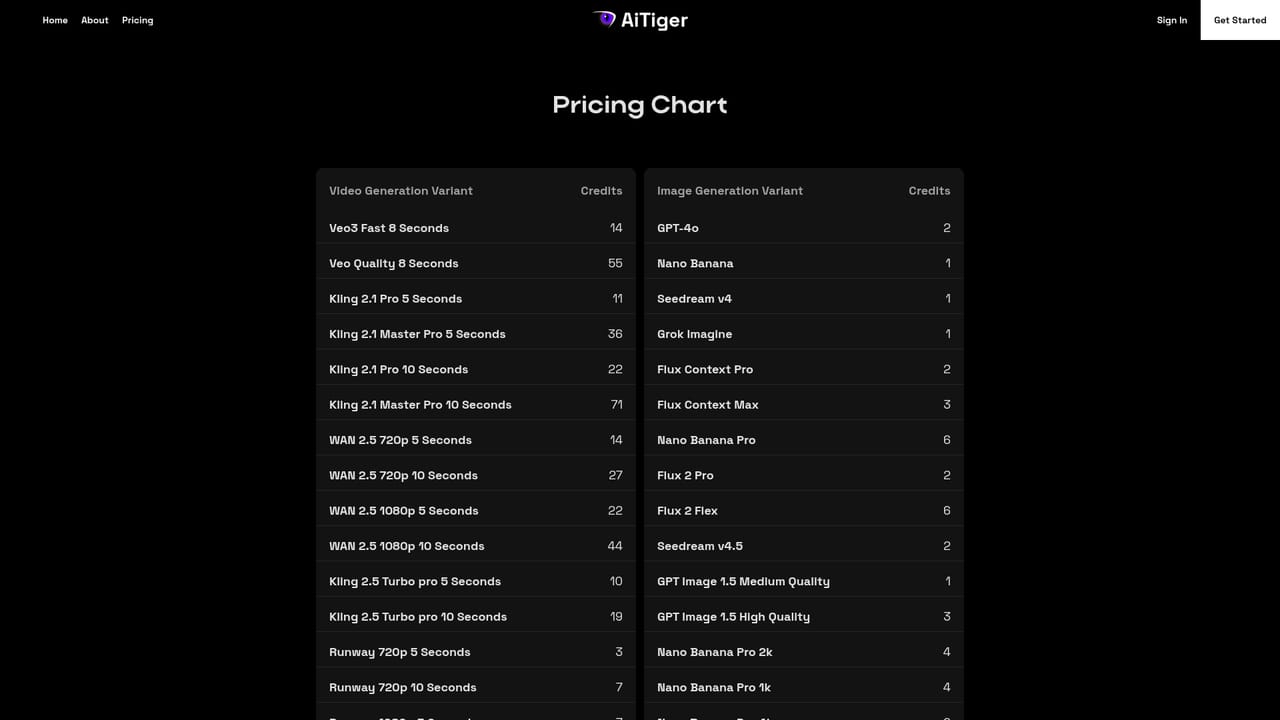
Learn moreA free plan carries 20 credits, roughly 20 seconds of generation. Pro is $29/mo with 600 credits, about 2 min 15 s of finished video. Enterprise is custom with priority rendering, white-labeling and team access. Standalone credit packs run from 600 credits at $29 to 50,000 at $1,861. Annual billing is available.
Learn moreSupport runs through a contact form on the homepage and a published email address, info@aitiger.ai. Enterprise plans add 1-on-1 support and a priority rendering queue.
Learn moreWorkflows cover story to video, dialogue scenes with lip sync, shot scripts, image to video, product ads and avatar explainers. Models include Seedance, Kling, Veo and Runway for video, GPT Image, Nano Banana and Seedream for stills, with Eleven Labs text to speech and multi-language output.
 AI Angels400+ customizable AI girlfriends for NSFW chat, voice calls, and roleplay
 Candy AIExperience the future of companionship with AI friends who chat, role-play, and connect with you on a human level.
 ourdream.aiA vast AI roleplay platform with millions of characters for chat, images, video and voiceAI Angels400+ customizable AI girlfriends for NSFW chat, voice calls, and roleplayCandy AIExperience the future of companionship with AI friends who chat, role-play, and connect with you on a human level.ourdream.aiA vast AI roleplay platform with millions of characters for chat, images, video and voice


