Entropic

A private desktop AI agent that runs on your own machine.

Beginner
Screenshot of Entropic, A private desktop AI agent that runs on your own machine

What is Entropic?

Entropic is a desktop AI agent for macOS, Windows and Linux that runs locally, keeps your files on your machine, and connects models, file editing, web browsing, Google apps, messaging and scheduled tasks in one app.

Entropic is a desktop application that puts a general purpose AI agent on your own computer. The app, your workspace and your files stay local. When you send a prompt, it is routed to whichever model provider you have chosen (OpenAI, Anthropic, Google, Meta, Mistral or DeepSeek), and the response comes back into the same chat. The design goal is a personal agent that is useful out of the box rather than a framework you assemble: the installer handles sign in and platform setup, and updates and security fixes arrive without manual maintenance. In daily use the agent can browse and summarize web pages from inside its sandbox, read, write and edit files in your workspace, and apply structured patches across a whole project without leaving the chat. Google integrations let it search Gmail, draft replies and work with calendar events, and messaging channels cover WhatsApp, Discord, Telegram and iMessage so it can send and receive where you already talk. Persistent memory carries context across conversations, and scheduled jobs using cron or interval options let recurring work run in the background. Security is the main differentiator against cloud based assistants. Code runs in an isolated container separated from your personal files and system, with the file system read only by default, and Entropic states that it does not train models on your data. Every tool and skill passes through the Cisco Skill Scanner before it reaches your machine, which gives you some visibility into what the agent is actually allowed to run. For regulated environments, Entropic Black packages the same idea as an on-premise appliance aimed at law firms, finance and R&D teams. The tool suits people who want agent style automation but are not willing to hand their documents to a hosted service or spend hours wiring up servers. It competes less with chat assistants and more with self hosted agent stacks: Entropic trades some configurability for a one click install. Anyone fully committed to a single model vendor, or working mostly on mobile, will find less to like here.

How do you use Entropic?

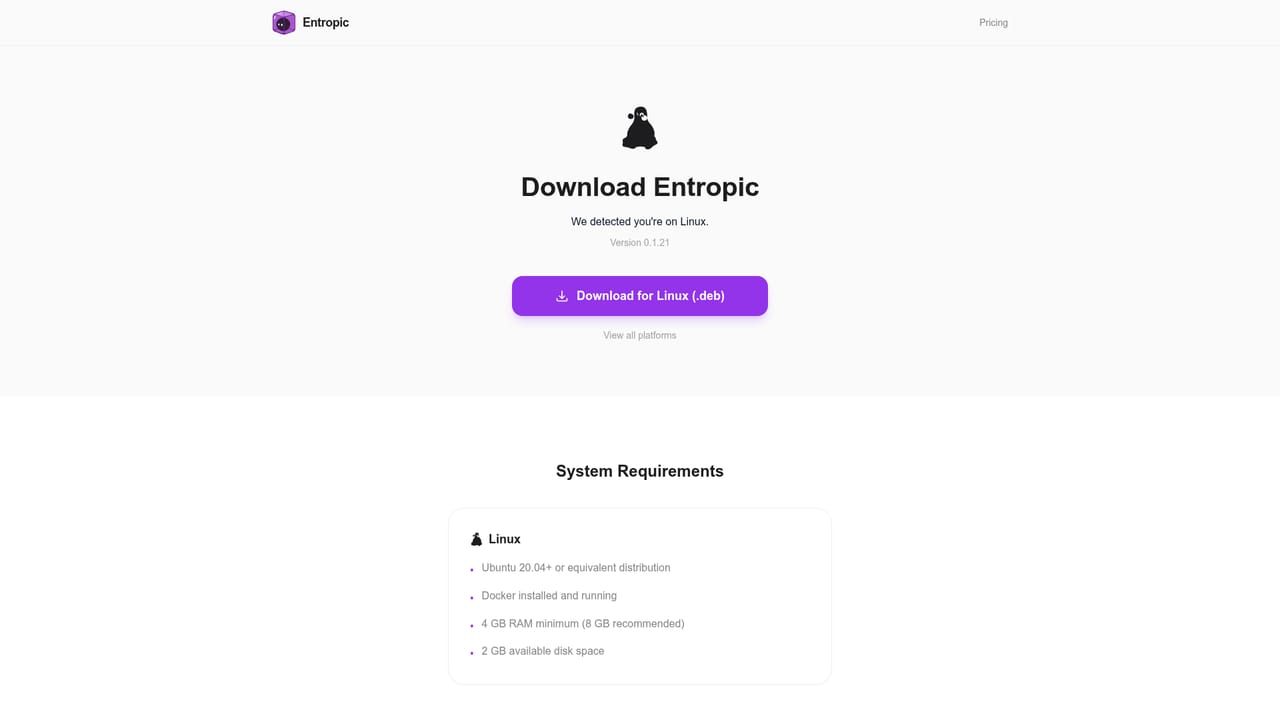
  1. 1Download the installer for your platform
    Grab the build for macOS, Windows or Linux from the download page. Entropic runs as a native desktop app, so there is no server to provision before you start.
    Entropic — Download the installer for your platform
  2. 2Sign in and finish onboarding
    The first launch walks you through sign in and the platform specific setup Entropic needs. This is also where account mode is configured if you plan to use Entropic credits.
  3. 3Choose a model or switch to your own keys
    In account mode a single selector lets you pick among supported providers. If you prefer local keys mode, add your provider credentials in Settings and switch models from there.
  4. 4Connect email, calendar and messaging
    Link Google for Gmail and Calendar, and configure any messaging channels you use. Once connected, the agent can search mail, draft replies and handle calendar events from the chat.
  5. 5Set up a scheduled task
    Create a job with a cron or interval schedule and describe the recurring work in plain language. The agent runs it in the background on your machine without any scripting.

Pros and cons

Pros

  • Files and workspace stay on your own computer, with code confined to an isolated sandbox.AI
  • Works with OpenAI, Anthropic, Google, Meta, Mistral and DeepSeek, so you are not locked to one vendor.AI
  • Gmail, Calendar, WhatsApp, Discord, Telegram and iMessage connect from chat rather than by hand.AI
  • Scheduled cron and interval jobs let recurring tasks run in the background without code.AI
  • Every tool and skill is scanned by the Cisco Skill Scanner before it reaches your machine.AI

Cons

  • Prompts still travel to the third party model provider you select, so it is not fully offline.AI
  • Pay as you go credits or your own API keys mean model costs are variable and hard to predict.AI
  • No mobile app, so the agent is tied to the desktop where it is installed.AI
  • Feature list is broad but the product is at v1.0, and depth per integration is not documented.AI
  • On-premise appliance option is aimed at firms and sits outside the standard download.AI

How much does Entropic cost?

Pricing

Entropic uses pay as you go credits with no subscription. Credits are topped up through Stripe and usage is tracked inside the app. A local keys mode is also available, in which you use your own provider billing instead of Entropic credits.

Learn more

Integrations

Google Gmail and Calendar, plus messaging channels for WhatsApp, Discord, Telegram and iMessage and connections to services such as X. Model access covers OpenAI, Anthropic, Google, Meta, Mistral and DeepSeek.

Features

Built in web browsing and summarization, an isolated code sandbox, read and write file management with project wide patches, Gmail and Google Calendar access, WhatsApp, Discord, Telegram and iMessage messaging, persistent memory across conversations, and cron or interval task scheduling. Tools and skills are scanned by the Cisco Skill Scanner before installation.

Frequently asked questions about Entropic

  • How much does Entropic cost?
    Entropic uses pay as you go credits with no subscription. Credits are topped up through Stripe and usage is tracked inside the app. A local keys mode is also available, in which you use your own provider billing instead of Entropic credits.
  • How do you use Entropic?
    The walkthrough on this page covers 5 steps: 1. Download the installer for your platform 2. Sign in and finish onboarding 3. Choose a model or switch to your own keys 4. Connect email, calendar and messaging 5. Set up a scheduled task.
  • What platforms does Entropic support?
    Entropic is available on MacOS, Windows and Linux.
  • What does Entropic integrate with?
    Google Gmail and Calendar, plus messaging channels for WhatsApp, Discord, Telegram and iMessage and connections to services such as X. Model access covers OpenAI, Anthropic, Google, Meta, Mistral and DeepSeek.
  • What are the limitations of Entropic?
    Prompts still travel to the third party model provider you select, so it is not fully offline. Pay as you go credits or your own API keys mean model costs are variable and hard to predict. No mobile app, so the agent is tied to the desktop where it is installed.

Status

StatusActive
Views0
Outbound clicks0
Added10/22/2026

Platforms

MacOSWindowsLinux

Pricing

PaidFree