Flow AI

Browser-based AI video generator for text, image, and frame-led clip drafts.

Beginner API
Screenshot of Flow AI, Browser-based AI video generator for text, image, and frame-led clip drafts

What is Flow AI?

Flow AI is a browser-based AI video generator offering text-to-video, image-to-video, and first and last frame generation, with a free entry point and paid tiers for commercial, high-volume, or API-driven production work.

Flow AI is a browser-based video generator that turns written prompts, still images, or a matched opening and closing frame into short AI-generated video clips. It runs directly in the browser and allows a first generation without creating an account, which lowers the barrier for quick creative tests. The tool supports three core input modes: text-to-video for pure concept exploration, image-to-video for continuity when a photo or key visual must anchor the frame, and first-and-last-frame generation for planned transitions and reveals. The product is built around a draft, review, and refine loop rather than a full timeline editor. Users frame an intent (subject, action, setting, camera feel, and output ratio), choose the matching input type, then compare several generated variations before exporting the strongest one for further editing or approval. This structure suits teams that need to validate a creative direction cheaply before committing to a reshoot or a full production pass. Flow AI targets e-commerce sellers testing product motion from approved photography, social creators drafting hooks and openings before publishing, and agencies or brand teams turning client briefs into previsualization cuts. It sits between stock footage libraries and traditional timeline editors: unlike stock footage it produces original scenes tied to a specific brief, and unlike a full editor it skips timeline assembly in favor of fast, comparable drafts. Paid plans add commercial licensing, priority rendering, higher resolution output, batch generation, and API access for teams with recurring production needs, while the free entry point keeps the tool accessible for occasional or exploratory use. Credit allocations determine output volume, so throughput scales with the chosen tier rather than with a flat subscription fee.
How do you use Flow AI?

  1. 1Choose a generation mode
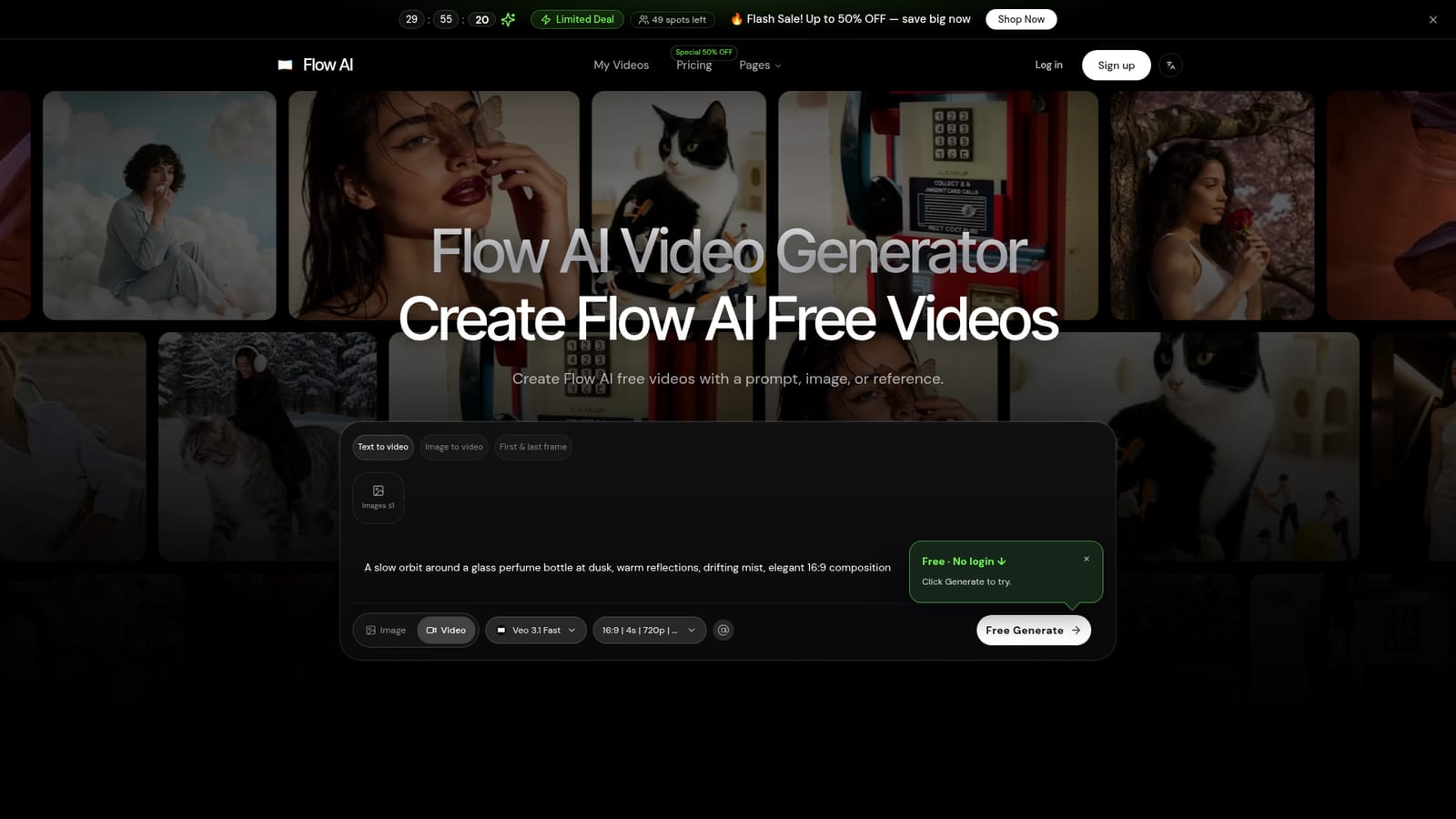
    On the homepage, select text-to-video, image-to-video, or first and last frame generation depending on whether you are starting from an idea, a photo, or a planned transition.
    Flow AI — Choose a generation mode
  2. 2Write a detailed prompt
    Describe the subject, action, setting, camera feel, and desired aspect ratio so the generated variations stay useful and comparable.
  3. 3Add an image or reference if needed
    Upload an approved product photo, portrait, or key visual when continuity matters more than a fresh text-only direction.
  4. 4Generate and review the draft
    Run the free generation and review pacing, framing, and mood against the brief before deciding whether to refine or export.
  5. 5Compare plans for production needs
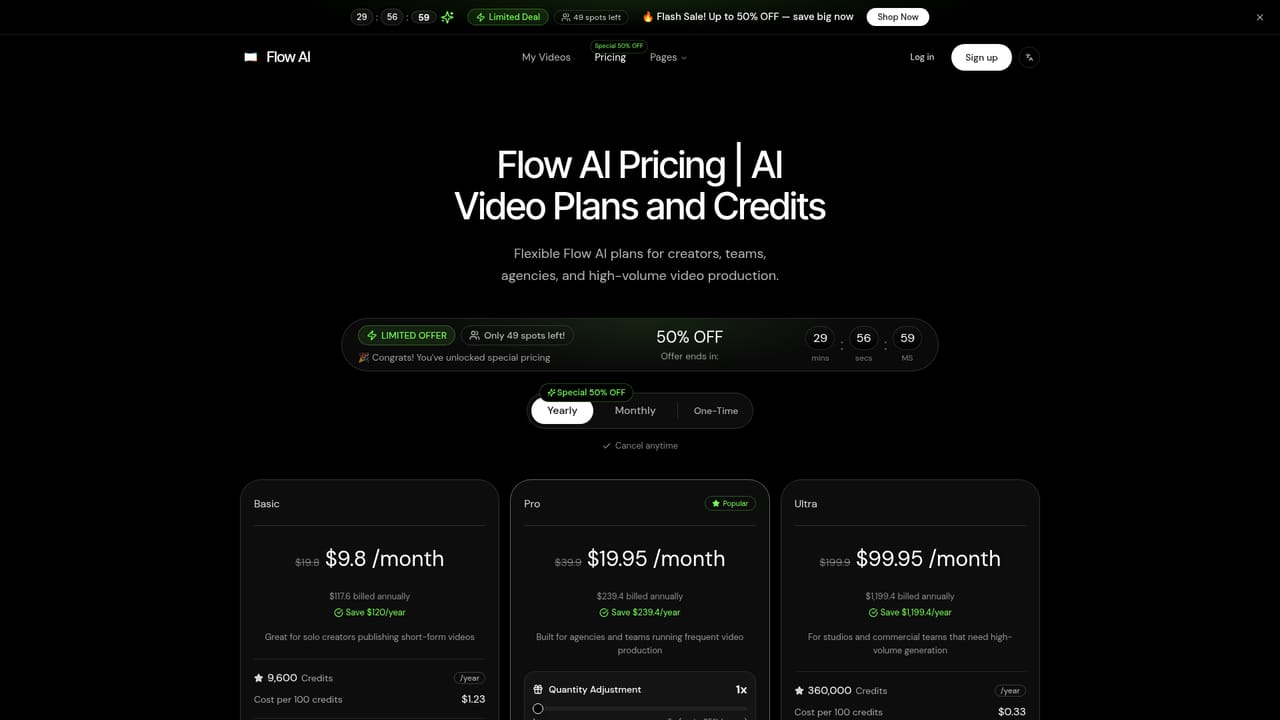
    Check the pricing page for credit volumes, commercial licensing, batch generation, and API access if the workflow moves beyond occasional drafts.
    Flow AI — Compare plans for production needs

Pros and cons

Pros

  • Allows a first video generation directly in the browser without creating an accountAI
  • Supports three distinct input modes: text, image, and first and last frame controlAI
  • Lets users generate and compare multiple variations before committing to a directionAI
  • Paid tiers add commercial licensing, batch generation, and API access for production teamsAI
  • Plans for vertical, square, and widescreen output from the start of a briefAI

Cons

  • Homepage does not disclose specific generation limits or resolution caps for the free tierAI
  • No mention of exporting project files to external editing software or timeline toolsAI
  • Credit costs rise sharply at scale, with the Ultra tier priced at $99.95 per month billed annuallyAI
  • Commercial use license and several free add-on tools are restricted to yearly billing on lower tiersAI
  • No technical detail is given on render times, model versions, or output consistency across runsAI

How much does Flow AI cost?

Free trial

The homepage generator lets anyone produce a video from a prompt, image, or reference without creating an account, acting as an open, no-signup entry point rather than a fixed-length trial.

Learn more

Pricing

Flow AI lists a free generation entry point plus three paid tiers: Basic ($9.8 or $9.8 per month billed annually), Pro ($19.95 per month billed annually), and Ultra ($99.95 per month billed annually), each with a yearly credit pool, monthly and one-time options, and a limited-time 50% off promotion.

Learn more

Support

Support is handled by email at support@flowai.studio, with dedicated support called out specifically on the Ultra plan.

Learn more

Features

Browser-based video generation from text prompts, images, or first and last frame pairs, with variation comparison, multiple aspect ratio planning, and workflows aimed at product shots, social hooks, and client previsualization.

Frequently asked questions about Flow AI

  • How much does Flow AI cost?
    Flow AI lists a free generation entry point plus three paid tiers: Basic ($9.8 or $9.8 per month billed annually), Pro ($19.95 per month billed annually), and Ultra ($99.95 per month billed annually), each with a yearly credit pool, monthly and one-time options, and a limited-time 50% off promotion.
  • Does Flow AI offer a free trial?
    The homepage generator lets anyone produce a video from a prompt, image, or reference without creating an account, acting as an open, no-signup entry point rather than a fixed-length trial.
  • Does Flow AI have an API?
    Yes, Flow AI offers an API.
  • How do you use Flow AI?
    The walkthrough on this page covers 5 steps: 1. Choose a generation mode 2. Write a detailed prompt 3. Add an image or reference if needed 4. Generate and review the draft 5. Compare plans for production needs.
  • What platforms does Flow AI support?
    Flow AI is available on Web App.
  • What are the limitations of Flow AI?
    Homepage does not disclose specific generation limits or resolution caps for the free tier. No mention of exporting project files to external editing software or timeline tools. Credit costs rise sharply at scale, with the Ultra tier priced at $99.95 per month billed annually.

Status

StatusActive
Views0
Outbound clicks0
Added10/18/2026

Platforms

Web App

Pricing

FreeFreemiumSubscription