GestionFlow

All-in-one business management for freelancers and SMBs.

Beginner
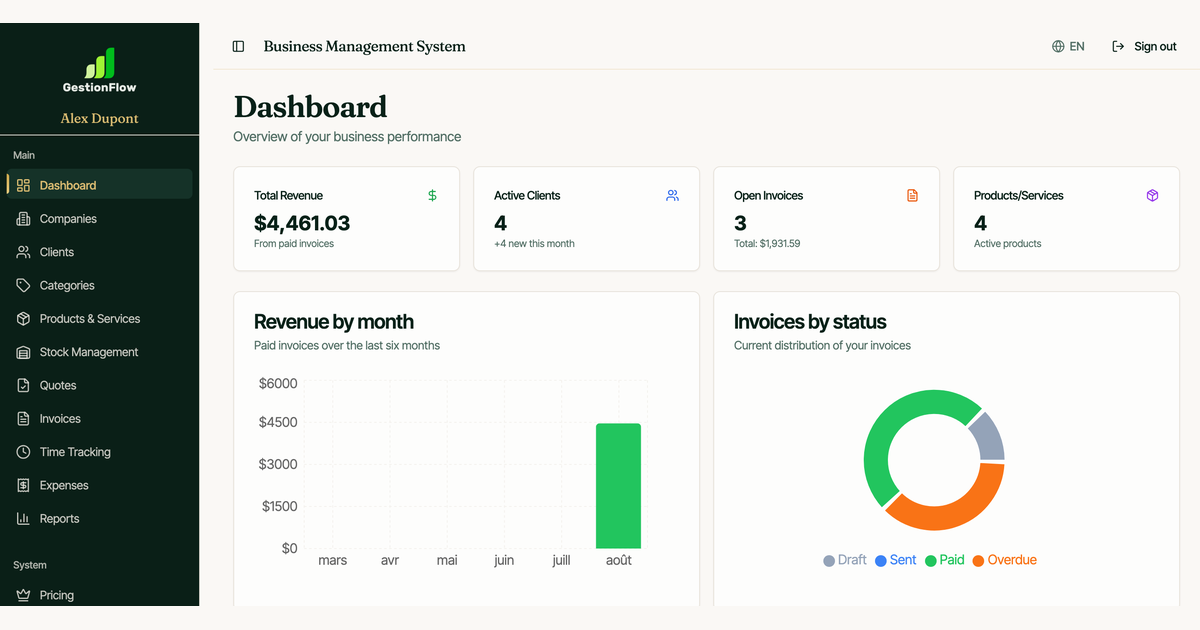
Screenshot of GestionFlow, All-in-one business management for freelancers and SMBs

What is GestionFlow?

GestionFlow is an accounting journal entries tool. GestionFlow combines invoicing, client management, expense tracking, time tracking, Stripe payments, and financial reports in one platform for freelancers, consultants, and SMBs. It supports multiple companies per account and offers a free plan plus desktop apps for Linux, Windows, and macOS.

GestionFlow is a business management platform that centralizes client records, invoicing, expenses, payments, time tracking, and reporting in a single workspace. It targets freelancers, consultants, agencies, and small to medium businesses that need to replace a patchwork of spreadsheets and separate apps with one system for day-to-day administration. The core workflow revolves around invoicing. Users create invoices in a few clicks, send them by email, and track payment statuses and due dates. Automatic reminders help chase unpaid invoices without manual follow-up. Clients can pay directly from the invoice through a Stripe integration, which reduces delays and improves cash flow. Time tracking records hours by client and converts them straight into billable lines, a useful bridge for consultants who bill hourly. Expenses are logged by category and company and feed into financial reports, while a multi-company mode lets consultants and agencies keep distinct settings, tax rules, and branding for each business under one login. Reporting covers revenue, taxes, products, expenses, clients, and invoices, with PDF and Excel exports included in all plans. The dashboard surfaces real-time statistics, recent activity, and quick actions. Customization extends to invoice templates, email templates, and color themes so documents match a firm's brand. The platform is available as a web app and as a desktop application for Linux, Windows, and macOS, which suits users who prefer a local install or work with limited browser access. Among small-business accounting tools, GestionFlow sits closer to an operations hub than a full double-entry bookkeeping suite: it handles billing, collections, and expense visibility rather than general ledger accounting. That makes it a good fit for independent professionals and small teams that want invoicing and client management without accounting complexity, while businesses needing formal bookkeeping or tax filing will likely pair it with a dedicated accountant or accounting package.

How do you use GestionFlow?

  1. 1Create your free account
    Sign up from the homepage with no credit card required. The free plan gives you a single company, 10 clients, and monthly limits on invoices and expenses.
  2. 2Add your company and clients
    Set up your company details including tax settings and logo, then add client records with contact information and custom hourly rates where relevant.
  3. 3Create and send an invoice
    Build an invoice in a few clicks, add line items or convert tracked hours, then send it by email. Statuses and due dates are tracked automatically.
  4. 4Connect Stripe for online payments
    Enable the Stripe integration so clients can pay directly from the invoice, which speeds up collection and improves cash flow.
  5. 5Log expenses and hours
    Record expenses by category and company, and track billable hours per client. Both feed into invoices and financial reports.
  6. 6Install the desktop app if preferred
    Download the Linux AppImage or .deb package, or choose the Windows or macOS build, to run GestionFlow locally instead of in the browser.

Pros and cons

Pros

  • Multi-company support lets consultants and agencies manage several businesses from one account with separate settings.AI
  • Invoicing workflow includes email delivery, payment statuses, due dates, and automatic reminders for unpaid invoices.AI
  • Stripe integration allows clients to pay directly from invoices, reducing collection delays.AI
  • Time tracking converts recorded hours into invoice line items, which suits hourly billing.AI
  • Reports with PDF and Excel exports are included in all plans, including the free tier.AI

Cons

  • Free plan caps usage at 1 company, 10 clients, 15 invoices per month, and 10 expenses per month, which is tight for active freelancers.AI
  • Stripe fees apply on top of subscription costs, and the Pro plan adds a 0.5% Stripe fee.AI
  • The platform focuses on billing and expense visibility rather than full double-entry accounting, so formal bookkeeping still needs another tool.AI
  • Desktop installers are versioned at 0.1.1, suggesting an early-stage application with a limited track record.AI
  • No public API or third-party integrations beyond Stripe are described on the site.AI

How much does GestionFlow cost?

Pricing

Free plan at $0 CAD/month with 1 company, 10 clients, 15 invoices and 10 expenses per month, plus PDF invoice download and revenue report. Premium is $9.99 CAD/month with 0% GestionFlow fees, tax reports, category management, and a modern invoice template. Pro is $14.99 CAD/month with unlimited companies, all reports, all templates, custom email templates, and a 0.5% Stripe fee.

Learn more

Integrations

Stripe is the only named integration, used for online payments directly from invoices. No other third-party integrations are described on the homepage.

Features

Multi-company management, centralized client records with custom hourly rates, professional invoicing with statuses and automatic reminders, Stripe online payments, expense tracking by category, time tracking converted to invoices, detailed reports (revenue, taxes, products, expenses, clients, invoices) with PDF and Excel export, and customization of invoice templates, emails, and color themes.

Frequently asked questions about GestionFlow

  • How much does GestionFlow cost?
    Free plan at $0 CAD/month with 1 company, 10 clients, 15 invoices and 10 expenses per month, plus PDF invoice download and revenue report. Premium is $9.99 CAD/month with 0% GestionFlow fees, tax reports, category management, and a modern invoice template. Pro is $14.99 CAD/month with unlimited companies, all reports, all templates, custom email templates, and a 0.5% Stripe fee.
  • How do you use GestionFlow?
    The walkthrough on this page covers 6 steps: 1. Create your free account 2. Add your company and clients 3. Create and send an invoice 4. Connect Stripe for online payments 5. Log expenses and hours 6. Install the desktop app if preferred.
  • What platforms does GestionFlow support?
    GestionFlow is available on Web App, Windows, MacOS and Linux.
  • What does GestionFlow integrate with?
    Stripe is the only named integration, used for online payments directly from invoices. No other third-party integrations are described on the homepage.
  • What are the limitations of GestionFlow?
    Free plan caps usage at 1 company, 10 clients, 15 invoices per month, and 10 expenses per month, which is tight for active freelancers. Stripe fees apply on top of subscription costs, and the Pro plan adds a 0.5% Stripe fee. The platform focuses on billing and expense visibility rather than full double-entry accounting, so formal bookkeeping still needs another tool.

Status

StatusActive
Views0
Outbound clicks0
Added10/21/2026

Platforms

Web AppWindowsMacOSLinux

Pricing

FreeFreemiumSubscription