Free trial
The free extension works without signup, and the site advertises a free start, though specific trial terms for paid plans are not listed on the homepage.
Learn moreTurn YouTube videos into summaries, transcripts and a visual knowledge base

InfoCaptor is a video text summary tool that turns YouTube videos into summaries, transcripts and a visual knowledge base. A free Chrome extension that transcribes YouTube videos, generates sectioned summaries, extracts tags and entities, and organizes everything into filterable dashboards with word clouds and a visual knowledge graph.
InfoCaptor AI is a Chrome extension that converts YouTube videos into concise summaries, timestamped transcripts and a structured knowledge base. Open a video, launch the extension, and it transcribes the audio, generates a TL;DR style summary broken into sections, and detects the people, companies and products mentioned along the way. Tags and categories are assigned automatically so nothing stays as an unlabeled block of text. The distinguishing feature is the visualization layer. Each summary produces a word cloud, a bubble pack view and an interactive force-directed knowledge graph that links videos, tags, categories and named entities. Dashboards regroup the same content by channel, tag or entity, so a researcher tracking a specific investor or company can filter every saved video that mentions them. Video pages carry the summary, the full transcript with timestamps and the embedded player together. Privacy is handled pragmatically: everything runs locally in the browser and no account is required to start. Signing in syncs transcripts and summaries to a cloud dashboard for cross-device access. The tool is aimed at students, researchers, journalists, founders, marketers and casual learners who treat YouTube as a learning channel but cannot justify the watch time. Public sample dashboards for channels such as Y Combinator, Neil Patel, MicroConf and MIT OpenCourseWare show what an organized collection looks like before committing. InfoCaptor sits in a crowded summarizer field, and it competes on organization rather than raw summary quality. Where most YouTube summarizers stop at a paragraph of text, this one treats each video as a data point to be tagged, filtered and mapped. The tradeoff is that the graph and dashboard views only pay off once a library exists, so the value grows with use rather than appearing on the first video.
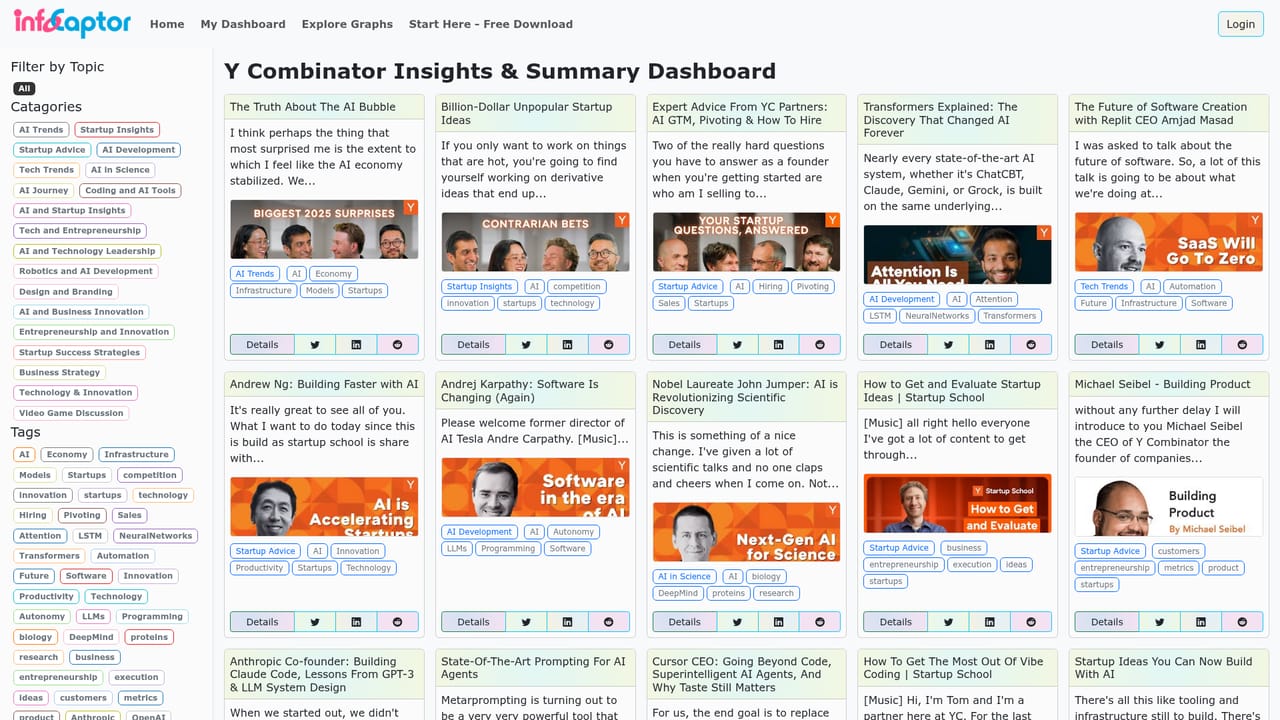
The free extension works without signup, and the site advertises a free start, though specific trial terms for paid plans are not listed on the homepage.
Learn moreThe Chrome extension is described as free, and the site links to a pricing page for paid tiers. Exact plan names and prices are not stated on the homepage.
Learn moreThe product ships as a Chrome extension that works directly on YouTube. No other integrations are described on the homepage.
Auto transcription with timestamps, instant sectioned summaries, auto tagging and categorization, entity extraction for people, companies and products, keyword frequency analysis, word clouds, bubble pack views, an interactive knowledge graph, filtering by tag, category or entity, dashboards by tag, channel and entity, detailed video pages, and local or cloud storage.
 AI Angels400+ customizable AI girlfriends for NSFW chat, voice calls, and roleplay
 Candy AIExperience the future of companionship with AI friends who chat, role-play, and connect with you on a human level.
 ourdream.aiA vast AI roleplay platform with millions of characters for chat, images, video and voiceAI Angels400+ customizable AI girlfriends for NSFW chat, voice calls, and roleplayCandy AIExperience the future of companionship with AI friends who chat, role-play, and connect with you on a human level.ourdream.aiA vast AI roleplay platform with millions of characters for chat, images, video and voice


