Free trial
No trial period is described. A Free Forever plan is offered instead, with no credit card required, so the menu basics can be used indefinitely.
Learn moreTurn your existing menu into a QR code menu with ordering

MenuForma is a QR tool that turns your existing menu into a QR code menu with ordering. MenuForma builds a QR code restaurant menu from a PDF, photo or website link, with multilingual menus in 70+ languages, EU allergen labels, table and room based ordering, Stripe payments and Google review collection.
MenuForma is a restaurant menu platform that converts the menu you already have into a digital QR code menu with an optional online ordering layer. An owner uploads a PDF, a photo, or a link to an existing website menu, and AI pulls out the dishes, prices and descriptions into an editable structure. From there the platform generates a QR code and a hosted menu page that guests open in a phone browser, with no app install and no diner account required to browse. The ordering side is where the product goes beyond a simple menu page. Depending on the QR mode chosen, guests can order for dine-in, pickup, takeaway or delivery, and the order arrives tagged with a table number, a room number or a unique customer number. Six link types cover different service styles: per-table codes, one venue-wide code, hotel room service codes, a shared tablet mode with PIN protection between sessions, a self-select mode where the guest shows a selection to a waiter, and a display-only mode that permits no ordering at all. Online payments run through Stripe, with card networks, wallets and regional methods such as iDEAL, Bancontact, PayNow, Alipay and WeChat Pay supported. The menu itself is built for mixed audiences. Content can be served in more than 70 languages, EU allergen labels can be attached to dishes, and a review request flow collects Google ratings after an order. A dashboard reports menu visits, popular dishes and sales, and multiple restaurants can be managed from one account. It suits independent restaurants, cafes, food courts, hotels and small groups that want a fast digital menu without a heavy POS migration. Compared with general QR code generators, the value is the ordering and translation layer; compared with full restaurant POS suites, it is lighter and menu-first, with payment handling delegated to Stripe rather than integrated hardware.
No trial period is described. A Free Forever plan is offered instead, with no credit card required, so the menu basics can be used indefinitely.
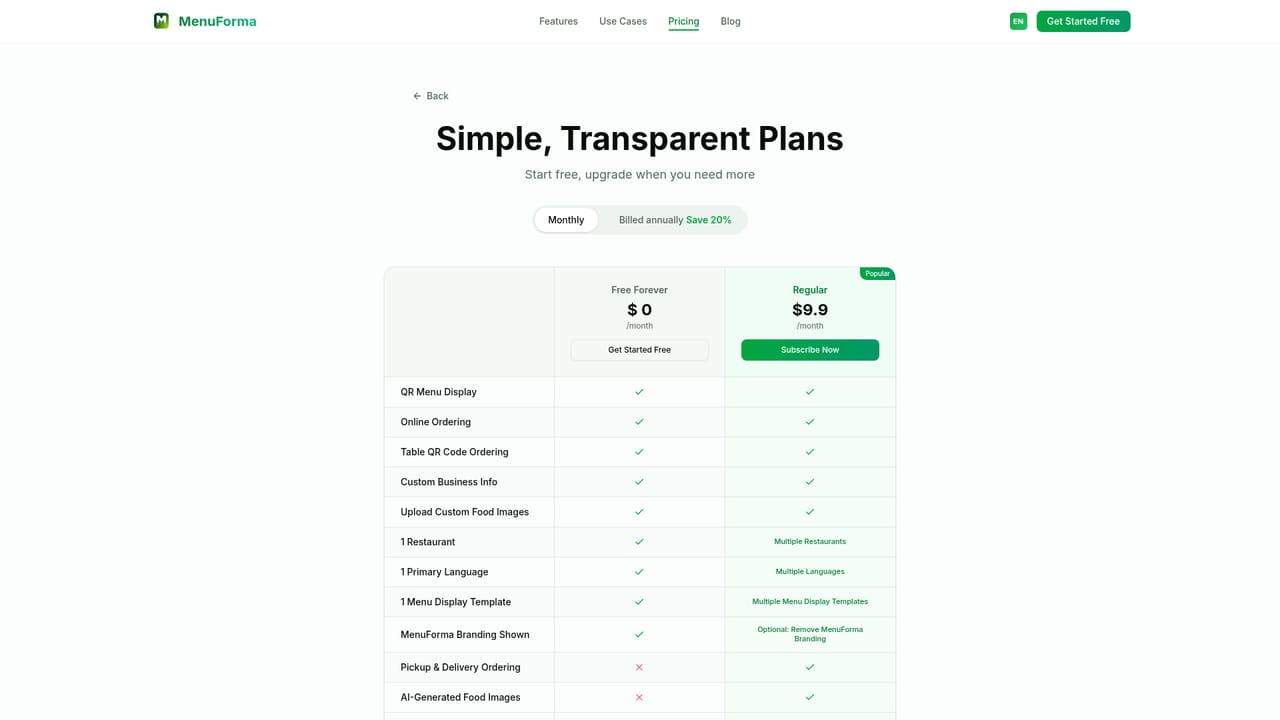
Learn moreFree Forever at $0 per month with no credit card, plus a Regular plan listed at $9.9 per month with annual billing saving 20 percent. The paid tier adds online ordering, table QR ordering, multiple languages and templates, custom images, payments and analytics. Full details are on the plans page.
Learn moreThe homepage does not describe a help centre, live chat or contact channel for customers, so support options should be confirmed before committing to a paid plan.
Payments are processed through Stripe and cover major card networks, Apple Pay, Google Pay, PayPal, Klarna, Afterpay and several regional methods. No other integrations or API are described on the homepage.
AI menu import from PDF, photo or website link, hosted QR code menu, six QR link modes, dine-in and pickup and delivery ordering, 70+ language translation, EU allergen labels, Stripe payments, Google review collection, analytics dashboard, receipt printing, custom branded QR codes and multi-location management.
 AI Angels400+ customizable AI girlfriends for NSFW chat, voice calls, and roleplay
 Candy AIExperience the future of companionship with AI friends who chat, role-play, and connect with you on a human level.
 ourdream.aiA vast AI roleplay platform with millions of characters for chat, images, video and voiceAI Angels400+ customizable AI girlfriends for NSFW chat, voice calls, and roleplayCandy AIExperience the future of companionship with AI friends who chat, role-play, and connect with you on a human level.ourdream.aiA vast AI roleplay platform with millions of characters for chat, images, video and voice