NoteVocal

Speak your notes and let AI turn them into clean text

Beginner
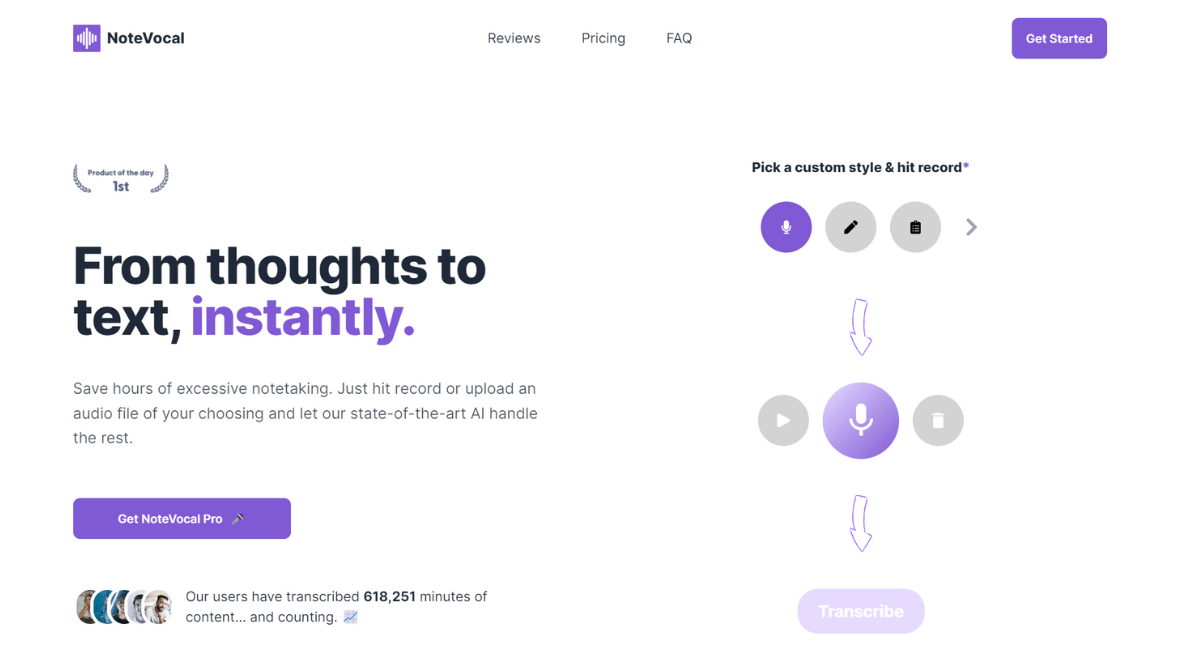
Screenshot of NoteVocal, Speak your notes and let AI turn them into clean text

What is NoteVocal?

NoteVocal is an AI transcriber tool that speaks your notes and let AI turn them into clean text. NoteVocal converts speech and uploaded audio into editable text, with selectable output styles such as blog posts or meeting minutes.

NoteVocal is a voice to text tool built around a simple loop: record yourself talking, then let the AI turn that audio into a usable written document. The homepage positions it less as a raw dictation utility and more as a way to skip the note taking habit entirely. You can speak freely, ignoring pauses and false starts, and the transcription engine handles the cleanup. Existing recordings are supported too, with uploads of up to 50MB in common formats such as MP3, WAV and FLAC. The part that separates it from a plain transcriber is the style layer. Instead of returning a verbatim transcript every time, NoteVocal lets you pick a format such as a blog post or meeting minutes, or write your own custom style with specific instructions. That makes it useful for people whose spoken output needs to become a finished artifact rather than a record of what was said. Everything lands in an editor where notes can be edited without limits, tagged, deleted, and exported to PDF, Word, email or WhatsApp, or copied as plain text. The stated use cases are broad: meetings, interviews, lectures, brainstorming, journaling, podcast show notes and content drafting. Journalists, students, podcasters and solo content creators are the clearest fits, since those groups tend to produce a lot of speech that later has to be written down. Support for more than 50 languages widens the audience further, and the site claims over 618,000 minutes transcribed to date. Among transcription tools, NoteVocal sits closer to the lightweight, self-serve end. It is a web app with no native desktop or mobile client mentioned, and it requires an internet connection for all features. Accuracy depends on speech clarity and background noise, so recordings made in loud environments will still need editing. The recorded session limit is 30 minutes per recording on the consumer plan, and file uploads are gated behind Pro.

How do you use NoteVocal?

  1. 1Record or upload your audio
    Hit record and speak naturally, ignoring pauses and grammar. Audio files up to 50MB in formats like MP3, WAV or FLAC can also be uploaded on a Pro plan.
  2. 2Pick a transcription style
    Choose verbatim output or a preset such as blog post or meeting minutes. For niche needs, define a custom style or give the AI specific instructions.
  3. 3Edit and organize the result
    Open the note in the built-in text editor, correct anything the AI misheard, and add tags to keep related notes grouped together.
  4. 4Share or export the note
    Send the finished text out as a PDF, Word document, email or WhatsApp message, or copy the content to paste it wherever you need it.

Pros and cons

Pros

  • Style presets and custom instructions turn rough speech into blog posts, meeting minutes or other formats rather than raw transcriptsAI
  • Handles uploaded audio files up to 50MB across common formats including MP3, WAV and FLACAI
  • Built-in editor supports unlimited editing, tagging and note deletion after transcriptionAI
  • Exports go to PDF, Word, email and WhatsApp, or copy the text out directlyAI
  • Works across more than 50 languages, which suits multilingual interviews and lecturesAI

Cons

  • Requires an internet connection for every feature, so offline recording and transcription is not possibleAI
  • Recorded sessions are capped at 30 minutes, which is short for long lectures or full-day workshopsAI
  • Audio file uploads are a Pro feature, so free users cannot bring existing recordings inAI
  • Accuracy depends on speech clarity and background noise, and the site offers no stated accuracy benchmarkAI
  • No native iOS or Android app is mentioned, and multiple license purchases are handled manually by emailAI

How much does NoteVocal cost?

Pricing

Two paid plans with a launch discount advertised. Monthly is listed at $20, discounted to $10 per month. Annual is $89 for the year (about $7.41 per month), down from $240. Both include unlimited transcriptions for the first 1,000 users, 50MB uploads, 50+ languages, custom styles and instructions. Payments run through Stripe.

Learn more

Support

Support is listed as 24/7 on both plans. The founder invites questions and feature suggestions by email at support@notevocal.com or via his X account, and multi-license purchases are arranged manually through that address.

Integrations

The homepage describes instant sharing with your team through other tools and lists export destinations such as Word, email and WhatsApp, but no named integrations or an API are documented.

Features

Voice recording plus audio file upload (up to 50MB, Pro), AI transcription in more than 50 languages, selectable output styles including blog posts and meeting minutes, custom styles and instructions, an editing workspace with tags, and export to PDF, Word, email and WhatsApp.

Frequently asked questions about NoteVocal

  • How much does NoteVocal cost?
    Two paid plans with a launch discount advertised. Monthly is listed at $20, discounted to $10 per month. Annual is $89 for the year (about $7.41 per month), down from $240. Both include unlimited transcriptions for the first 1,000 users, 50MB uploads, 50+ languages, custom styles and instructions. Payments run through Stripe.
  • How do you use NoteVocal?
    The walkthrough on this page covers 4 steps: 1. Record or upload your audio 2. Pick a transcription style 3. Edit and organize the result 4. Share or export the note.
  • What platforms does NoteVocal support?
    NoteVocal is available on Web App.
  • What does NoteVocal integrate with?
    The homepage describes instant sharing with your team through other tools and lists export destinations such as Word, email and WhatsApp, but no named integrations or an API are documented.
  • What are the limitations of NoteVocal?
    Requires an internet connection for every feature, so offline recording and transcription is not possible. Recorded sessions are capped at 30 minutes, which is short for long lectures or full-day workshops. Audio file uploads are a Pro feature, so free users cannot bring existing recordings in.

Status

StatusActive
Views0
Outbound clicks0
Added10/21/2026

Platforms

Web App

Pricing

PaidSubscription