Pixelfox Objects Remover

Erase people, text and clutter from photos while the background rebuilds itself

Beginner
Pixelfox Objects Remover

What is Pixelfox Objects Remover?

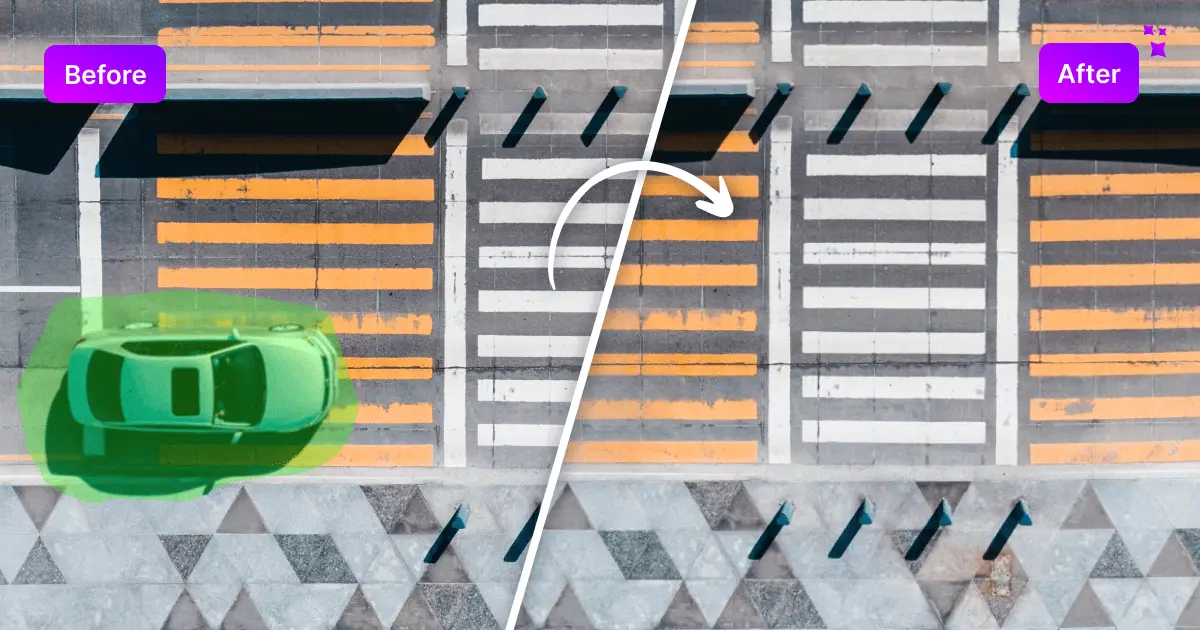
Pixelfox Objects Remover is an edit pictures tool. A web and mobile object remover from Pixelfox AI that brushes over people, text, logos or clutter and rebuilds the background with inpainting. Free to try, no editing skills needed, with batch processing for larger image sets.

Pixelfox Objects Remover is a browser based utility for deleting unwanted elements from photographs. People in the back of a shot, stray logos, text overlays, watermarks, or general clutter can all be brushed over and replaced with reconstructed background by an AI inpainting model. The tool sits inside the wider Pixelfox AI photo editor, which bundles background removal, image expansion, enhancement, upscaling and colorization alongside it, so a single session can cover several cleanup jobs without switching services. Operation is deliberately narrow. Users upload a JPG, PNG or HEIF file through the upload button, a drag and drop zone, or by pasting from the clipboard. A brush tool marks the region to delete, and the brush size can be adjusted for fine edges or large areas. The underlying AIGC inpainting model, described by Pixelfox as deep learning based, analyses the surrounding pixels and fills the hole so the repair blends with the original scene. Results are downloaded directly, with no layered project file to manage. The intended audience is broad rather than specialist. Ecommerce sellers and product photographers use it to clear residue, blemishes or distracting props from catalogue shots. Social media creators and travel photographers use it to simplify compositions and drop photobombers. Because no editing background is required, casual users handling a handful of holiday photos are served by the same interface as professionals. Pixelfox also states that batch processing is supported for larger image collections, which is the main reason a business would pick this over a one-off mobile retouch app. Against dedicated desktop retouching software, the trade-off is control. Pixelfox offers a brush and an automatic fill, not clone stamping, masking layers or manual reconstruction, so jobs that need surgical precision will still land in Photoshop or similar. Against other browser object removers, the differentiator is the surrounding toolset and the claim that uploads are processed in real time without being stored. Anyone already inside the Pixelfox ecosystem gets the shortest path; everyone else gets a fast, low friction eraser with modest expectations attached.

How do you use Pixelfox Objects Remover?

  1. 1Open the object remover
    Load the remover page in a desktop or mobile browser. No install or account check is described on the homepage, so the upload area is the starting point.
  2. 2Upload your photo
    Click Upload Image and pick a JPG, PNG or HEIF file, drag and drop the image onto the page, or paste it with Ctrl plus V. Sample images are offered if you want to test first.
  3. 3Brush over what should go
    Use the brush to highlight the people, objects, text or watermarks you want erased, resizing the brush for tight edges or broad areas. The AI fills the marked region automatically.
  4. 4Check the repaired background
    Review the filled area against the surrounding scene. If the blend looks off, adjust the selection and run the removal again before moving on.
  5. 5Download the cleaned image
    Save the finished file and use it wherever the original was headed, whether that is a product listing, a social post or a client handoff.
  6. 6Explore the rest of the editor
    If the image needs more work, jump to inpaint, background removal, expansion, enhancement, upscaling or colorization from the toolset.

Pros and cons

Pros

  • Brush and automatic fill workflow keeps the learning curve close to zeroAI
  • Handles people, pets, text, watermarks, logos and background clutter in one toolAI
  • Sits alongside background removal, upscaling, enhancement and colorization in the same editorAI
  • Batch processing is stated for clearing objects from large image collectionsAI
  • Pixelfox says uploads are processed in real time and not stored or sharedAI

Cons

  • No manual repair tools such as clone stamping, so precise reconstruction is not possibleAI
  • Accuracy on complex textures is asserted by the vendor but not demonstrated with sample comparisons on the pageAI
  • Pricing and credit costs are not published on the homepage, so total cost is unclear before signing upAI
  • Batch processing and file handling details are only summarised in the FAQ, with no documented limitsAI
  • Output is a flattened download, which rules out revisiting an edit later without redoing itAI

How much does Pixelfox Objects Remover cost?

Free trial

The homepage markets Pixelfox as a free AI photo editor and invites users to try it for free, but it does not state trial length, credit limits or what a free run includes.

Learn more

Features

Brush based object deletion driven by AIGC inpainting, aimed at people, pets, text, watermarks, logos and background clutter. Accepts JPG, PNG and HEIF via upload, drag and drop or clipboard paste, with an adjustable brush size. Pixelfox states batch processing is supported and that uploaded images are processed in real time without being stored. Related tools in the same editor cover inpainting by text prompt, background removal, image expansion, enhancement, upscaling and colorization.

Learn more

Frequently asked questions about Pixelfox Objects Remover

  • Does Pixelfox Objects Remover offer a free trial?
    The homepage markets Pixelfox as a free AI photo editor and invites users to try it for free, but it does not state trial length, credit limits or what a free run includes.
  • How do you use Pixelfox Objects Remover?
    The walkthrough on this page covers 6 steps: 1. Open the object remover 2. Upload your photo 3. Brush over what should go 4. Check the repaired background 5. Download the cleaned image 6. Explore the rest of the editor.
  • What platforms does Pixelfox Objects Remover support?
    Pixelfox Objects Remover is available on Web App, iOS and Android.
  • What are the limitations of Pixelfox Objects Remover?
    No manual repair tools such as clone stamping, so precise reconstruction is not possible. Accuracy on complex textures is asserted by the vendor but not demonstrated with sample comparisons on the page. Pricing and credit costs are not published on the homepage, so total cost is unclear before signing up.

Status

StatusActive
Views0
Outbound clicks0
Added10/21/2026

Platforms

Web AppiOSAndroid

Pricing

Freemium