PuppiesAI

Text prompt to puppy pictures, nothing else

Beginner
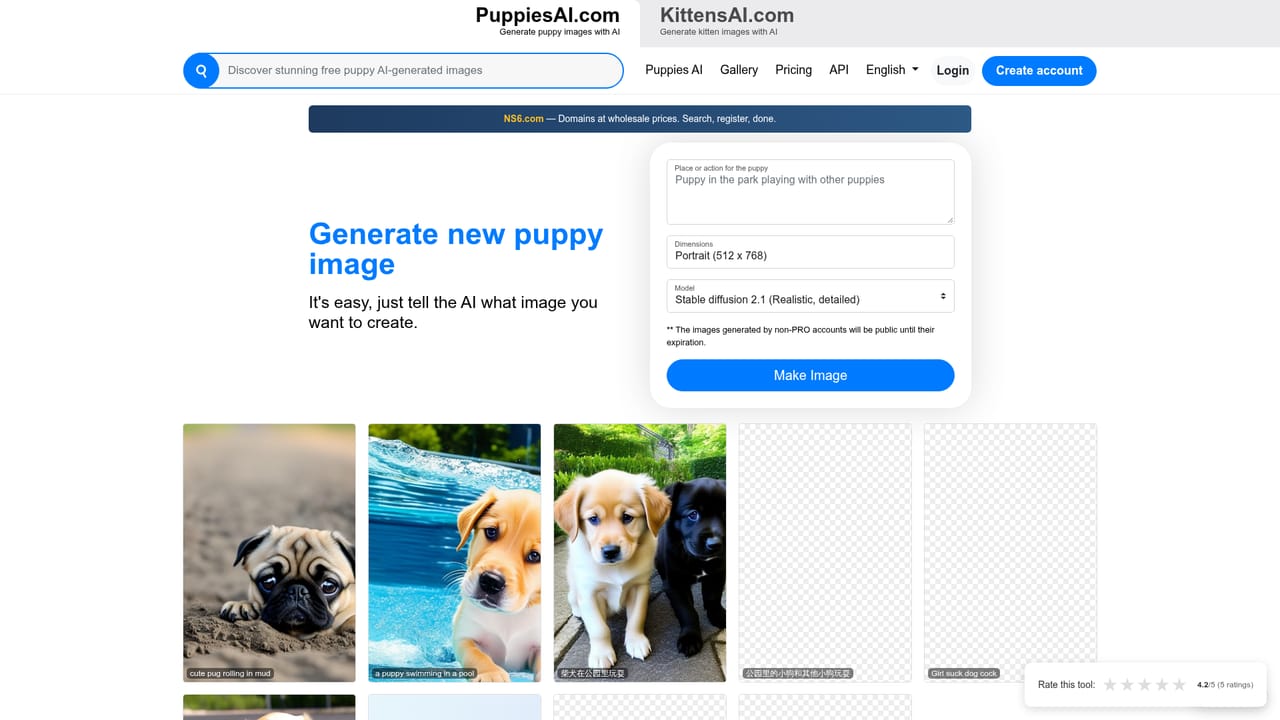
Screenshot of PuppiesAI, Text prompt to puppy pictures, nothing else

What is PuppiesAI?

PuppiesAI is a generative image tool. A single purpose AI image generator that turns a short text description into a picture of a puppy. Prompts work in English and Chinese, results are saved on shareable pages, and a public gallery of past outputs doubles as inspiration for new prompts.

PuppiesAI is a narrow, single purpose image generator: describe a puppy scene in plain text and the site returns a generated picture of a dog. There is no model selector, no style library and no editing canvas, just a prompt box that is framed around one subject. The public result gallery shows the range it covers, from a puppy swimming in a pool to a pug rolling in mud and a shiba inu playing in a park, and prompts appear to work in both English and Chinese. The product suits a small set of users: someone who wants a quick cute dog image for a personal project, a social post or a mockup, and hobbyists who enjoy rerolling prompts until a charming result appears. It is not a general image tool, so anyone needing product shots, portraits or brand assets will be better served by a multi purpose generator. Compared with tools such as Midjourney or DALL E, PuppiesAI trades breadth for having nothing to configure: the topic is fixed and the workflow is one field plus a button. The visible flow mirrors that simplicity. Clicking Create New opens a prompt screen where the instruction is effectively "make a puppy with the following description," and the site adds that prefix to whatever the user types. Finished images are stored on a result page with a shareable link, and the homepage and explore pages collect past outputs as a public gallery. That gallery doubles as a prompt reference: each thumbnail sits under the text that produced it, so new users can borrow wording that works. Two caveats belong in any honest assessment. First, no account tiers, credit limits or subscription prices appear on the site, so the commercial model behind generation is unclear at the time of writing. Second, the public feed is unmoderated in tone: alongside harmless pool and park scenes, some captions and thumbnails are explicit, which makes the gallery awkward to show to children or clients even though the stated purpose is wholesome. Treat the tool as an experimental toy with a public, unpredictable gallery rather than a polished creative suite.

How do you use PuppiesAI?

  1. 1Open the generator
    From the homepage, choose Create New to reach the prompt screen. This is the whole tool: nothing else needs to be installed or configured.
    PuppiesAI — Open the generator
  2. 2Describe the puppy scene
    Type a short description such as a puppy swimming in a pool or a shiba inu playing in a park. The site adds a make a puppy with the following description prefix on its own, so write only the scene.
  3. 3Generate and review the image
    Submit the prompt and wait for the result page. If the picture misses, adjust the breed, setting or fur detail and run it again; small wording changes shift the output noticeably.
  4. 4Keep or share the result page
    Each generation gets its own result URL, which can be bookmarked or sent to someone else. Save the image file if you need it outside the site.
  5. 5Mine the gallery for prompt ideas
    Browse the explore pages to see past outputs next to the captions that produced them. Borrow useful phrasing and swap in your own breed or setting.

Pros and cons

Pros

  • Extremely simple workflow: one prompt field and a generate button, with no settings to learnAI
  • Prompt prefix does the heavy lifting, so beginners do not need to write detailed instructionsAI
  • Public gallery of earlier results shows the exact prompt behind each image, which helps newcomersAI
  • Handles prompts in both English and Chinese, based on the captions on the showcase imagesAI
  • Shareable result pages make it easy to keep or pass along a specific image linkAI

Cons

  • No stated pricing, credit allowance or account tiers, so the cost of use is unclearAI
  • The homepage gallery mixes explicit captions and thumbnails into an otherwise family friendly puppy feedAI
  • Single narrow subject, with no style controls, model choice, aspect ratio or editing toolsAI
  • No visible documentation, help centre or support channel on the siteAI
  • No desktop or mobile apps and no integrations; it exists only as a web pageAI

How much does PuppiesAI cost?

Features

Text to image generation limited to puppy subjects, with a single prompt box and no style or model controls. Prompts are accepted in English and Chinese. Every output gets its own shareable result page, and past generations are gathered into public explore galleries that display the original prompt under each thumbnail.

Frequently asked questions about PuppiesAI

  • How do you use PuppiesAI?
    The walkthrough on this page covers 5 steps: 1. Open the generator 2. Describe the puppy scene 3. Generate and review the image 4. Keep or share the result page 5. Mine the gallery for prompt ideas.
  • What platforms does PuppiesAI support?
    PuppiesAI is available on Web App.
  • What are the limitations of PuppiesAI?
    No stated pricing, credit allowance or account tiers, so the cost of use is unclear. The homepage gallery mixes explicit captions and thumbnails into an otherwise family friendly puppy feed. Single narrow subject, with no style controls, model choice, aspect ratio or editing tools.

Status

StatusActive
Views0
Outbound clicks0
Added10/21/2026

Platforms

Web App

Pricing

FreeFreemium