Free trial
New accounts get free designs to try in most countries, with no card required. The homepage does not state how many free designs are included.
Learn moreUpload a photo of any room or house and see it redesigned in seconds.
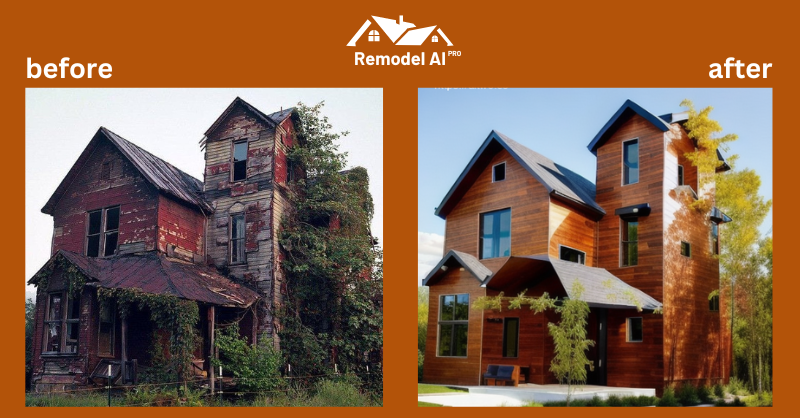
Remodel AI converts a photo of a room, house exterior or yard into a photorealistic redesign in about 30 seconds. Ten specialized tools cover interior restyling, facades, paint by hex code, landscaping, virtual staging and a kitchen visualizer, aimed at homeowners planning renovations and agents preparing listings.
Remodel AI is a browser based home design tool built around a single, narrow workflow: you supply a photograph, the model returns a redesigned version of the same space. The upload can be a living room, a bedroom, a kitchen, a front facade or a backyard. The system analyzes the image, applies a chosen style, and produces a photorealistic render in roughly 30 seconds. The company reports more than 38,000 designs created and lists 21 interior styles alongside 24 exterior materials. The toolset is split into 10 specialized modules rather than one general editor. Interior AI handles full room redesigns and can either keep or replace existing furniture. Exterior AI applies new siding, roofing and facade styles, with a slider that controls how much of the original house is preserved. Separate tools cover paint (including exact colors entered as a hex code), landscape and garden planning, virtual staging of empty rooms, seasonal and occasion decorating, architectural concept generation, and an enhancement pass for existing images. A kitchen visualizer lets you choose cabinets, counters, backsplash and flooring and returns a parts list with the render. The audience spans two groups. Homeowners use it to test renovation ideas before committing money to contractors or materials, and real estate agents use the staging and exterior tools to prepare listings. Designers can use it for quick concept exploration. Because it works from photos rather than floor plans or 3D models, it is a visualization aid, not a replacement for measured drawings or a design professional. Compared with full interior design software, Remodel AI is considerably simpler and faster, trading precision and editable geometry for instant photographic output. The closest alternatives are general purpose image generators and other room redesign apps; this one distinguishes itself through depth of home specific modes (paint by hex, virtual staging, kitchen parts lists) rather than breadth of creative control. Paid plans remove watermarks and grant commercial use.
New accounts get free designs to try in most countries, with no card required. The homepage does not state how many free designs are included.
Learn moreThree weekly plans: Basic at $6.99 per week with 100 premium credits, Plus at $9.99 per week with 300 credits, and Premium at $14.99 per week with 500 credits and priority support. Weekly, monthly and yearly billing cycles are offered. All paid plans include every AI tool, no watermarks and commercial use.
Learn moreEmail support is included on all plans, and Premium adds priority support. The site also publishes an FAQ covering ownership, data storage, deletion, file formats and refunds.
Ten AI tools cover interior redesign, furniture swapping, exterior and facade design with a keep-original slider, paint color changes including exact hex codes, landscape and garden planning, virtual staging of empty rooms, a kitchen visualizer with a parts list, architectural concepts, seasonal and occasion decor, and image enhancement. The company reports over 38,000 designs created and results in about 30 seconds.
Learn more AI Angels400+ customizable AI girlfriends for NSFW chat, voice calls, and roleplay
 Candy AIExperience the future of companionship with AI friends who chat, role-play, and connect with you on a human level.
 ourdream.aiA vast AI roleplay platform with millions of characters for chat, images, video and voiceAI Angels400+ customizable AI girlfriends for NSFW chat, voice calls, and roleplayCandy AIExperience the future of companionship with AI friends who chat, role-play, and connect with you on a human level.ourdream.aiA vast AI roleplay platform with millions of characters for chat, images, video and voice