ActionGPT

A meeting copilot that listens, answers and writes up the notes

Beginner
Screenshot of ActionGPT, A meeting copilot that listens, answers and writes up the notes

What is ActionGPT?

ActionGPT is a Chrome and Edge extension that listens to meetings in Zoom, Google Meet, Teams, YouTube and Udemy, answers questions in real time, grounds replies in uploaded PDFs and emails meeting summaries with action items to the user.

ActionGPT is a browser extension that sits alongside a live call and acts as a second brain during the conversation. It listens to the meeting audio, keeps track of what is being discussed, and produces context-aware answers when a question lands on the user, so the reply is formed before the silence becomes awkward. It runs inside Chrome and Edge and is marketed for use with Zoom, Google Meet, Microsoft Teams, YouTube and Udemy sessions. The tool goes beyond live answers. Users can upload PDF documents to the dashboard so the assistant draws on company policies, product material or own notes when it responds, rather than producing generic output. At the end of a session ActionGPT generates meeting minutes with action items and deadlines and emails them to the account, and those summaries can be saved and searched later through the meetings area of the dashboard. Settings control the language used for chat and the length of replies in conversations and email summaries. The company states that audio is not recorded or stored without consent. It is aimed at people who speak in meetings and need to keep up: sales reps handling objections, support staff on client calls, students following lectures, and professionals who want the write-up handled automatically. The workflow is deliberately lightweight, requiring an extension install, a pin to the toolbar and a sign-up before prompts become available. Compared with dedicated notetakers that join a call as a separate bot, ActionGPT works from the user's own browser, which suits people who cannot add a participant to the meeting. The trade-off is that everything depends on the extension being installed and active. Allowances are counted in daily prompts, so heavy users should check the limits before committing to a plan.

How do you use ActionGPT?

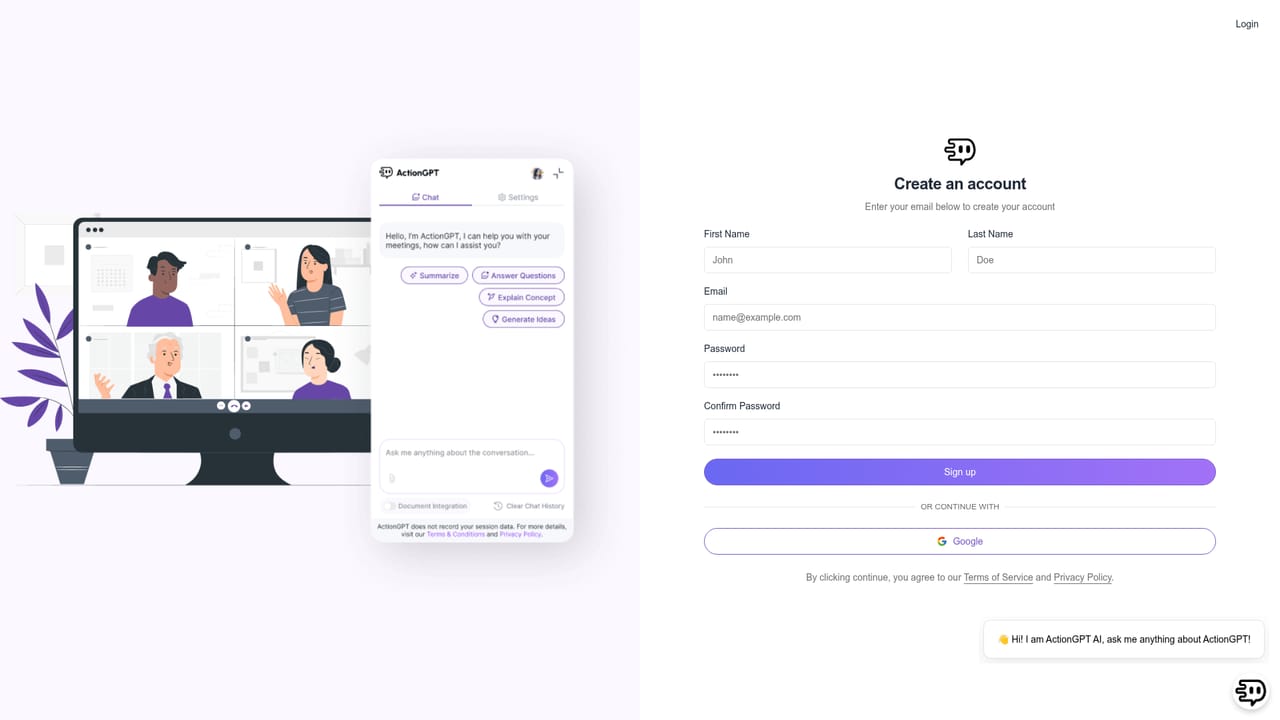
  1. 1Create an account
    Sign up on the ActionGPT site before downloading anything. The download link for the extension is unlocked after registration, and the free plan begins from that account.
    ActionGPT — Create an account
  2. 2Install the extension and pin it
    Add ActionGPT to Chrome or Edge from the Web Store, then click the puzzle icon in the toolbar and pin it so the chat panel is one click away during calls.
    ActionGPT — Install the extension and pin it
  3. 3Upload documents for context
    Open My Documents and add the PDFs that hold your policies, product facts or reference material. Each plan sets a limit on how many sources you can keep connected.
    ActionGPT — Upload documents for context
  4. 4Set language and response length
    In Settings, choose the language the assistant chats in and pick how long answers and email summaries should be. Shorter replies read better on screen mid-call.
    ActionGPT — Set language and response length
  5. 5Run it through a live meeting
    Join a Zoom, Meet or Teams call with the extension pinned and ask ActionGPT questions as the discussion moves. Prompt usage against your daily allowance is visible in the dashboard.
  6. 6Review summaries and actions
    After the call, check the emailed minutes with action items and deadlines, then use the Meetings area to search earlier write-ups when you need to revisit a decision.

Pros and cons

Pros

  • Works from the user's browser rather than joining calls as a visible bot participantAI
  • Answers are grounded in uploaded PDF documents, so replies can reflect internal policy and product detailAI
  • Meeting minutes with action items and deadlines are emailed automatically and stay searchable in the dashboardAI
  • Free tier includes daily prompts, email summaries and one PDF data source, enough to test the core loopAI
  • Response language and length can be adjusted in settings, which helps non-English speakersAI

Cons

  • Prompt allowances are daily and capped even on paid tiers, so long meeting days can exhaust the quotaAI
  • PDF upload is the only documented knowledge source, with no mention of connecting drives, wikis or CRM recordsAI
  • Requires the Chrome or Edge extension, so Safari, Firefox and mobile-only users are left outAI
  • The FAQ answers describe a generic action-execution tool and do not match the meeting assistant described on the homepage, which makes support content less trustworthyAI
  • Marketing lists priority and 24/7 support even on the free plan, so it is unclear what paid tiers actually add in service termsAI

How much does ActionGPT cost?

Pricing

Four tiers. Free is $0 with 5 prompts per day and 1 PDF source. Starter is $5 per month with 30 prompts per day and 3 PDF sources. Professional is $15 per month with 60 prompts per day and 10 PDF sources. Enterprise is custom with unlimited prompts and sources. Yearly billing is shown at 50 percent off for the first year.

Learn more

Support

Priority support and 24/7 customer support are listed on every plan, including the free tier. A FAQ page and an on-site chat widget handle common questions.

Learn more

Integrations

Runs as a Chrome and Edge extension alongside Zoom, Google Meet, Microsoft Teams, YouTube and Udemy. Knowledge sources are limited to PDF uploads.

Features

Real-time answers to questions during meetings, live idea generation, responses grounded in uploaded PDF documents, automatic email summaries with action items and deadlines, searchable meeting history, configurable chat language and reply length, and a dashboard covering meetings, documents, billing and referrals.

Frequently asked questions about ActionGPT

  • How much does ActionGPT cost?
    Four tiers. Free is $0 with 5 prompts per day and 1 PDF source. Starter is $5 per month with 30 prompts per day and 3 PDF sources. Professional is $15 per month with 60 prompts per day and 10 PDF sources. Enterprise is custom with unlimited prompts and sources. Yearly billing is shown at 50 percent off for the first year.
  • How do you use ActionGPT?
    The walkthrough on this page covers 6 steps: 1. Create an account 2. Install the extension and pin it 3. Upload documents for context 4. Set language and response length 5. Run it through a live meeting 6. Review summaries and actions.
  • What platforms does ActionGPT support?
    ActionGPT is available on Browser extension and Web App.
  • What does ActionGPT integrate with?
    Runs as a Chrome and Edge extension alongside Zoom, Google Meet, Microsoft Teams, YouTube and Udemy. Knowledge sources are limited to PDF uploads.
  • What are the limitations of ActionGPT?
    Prompt allowances are daily and capped even on paid tiers, so long meeting days can exhaust the quota. PDF upload is the only documented knowledge source, with no mention of connecting drives, wikis or CRM records. Requires the Chrome or Edge extension, so Safari, Firefox and mobile-only users are left out.

Status

StatusActive
Views0
Outbound clicks0
Added10/22/2026

Platforms

Browser extensionWeb App

Pricing

FreemiumSubscription