ImgEnhancer.app

Browser-based AI upscaler that pushes photos to 8K without an account

Beginner
Screenshot of ImgEnhancer.app, Browser-based AI upscaler that pushes photos to 8K without an account

What is ImgEnhancer.app?

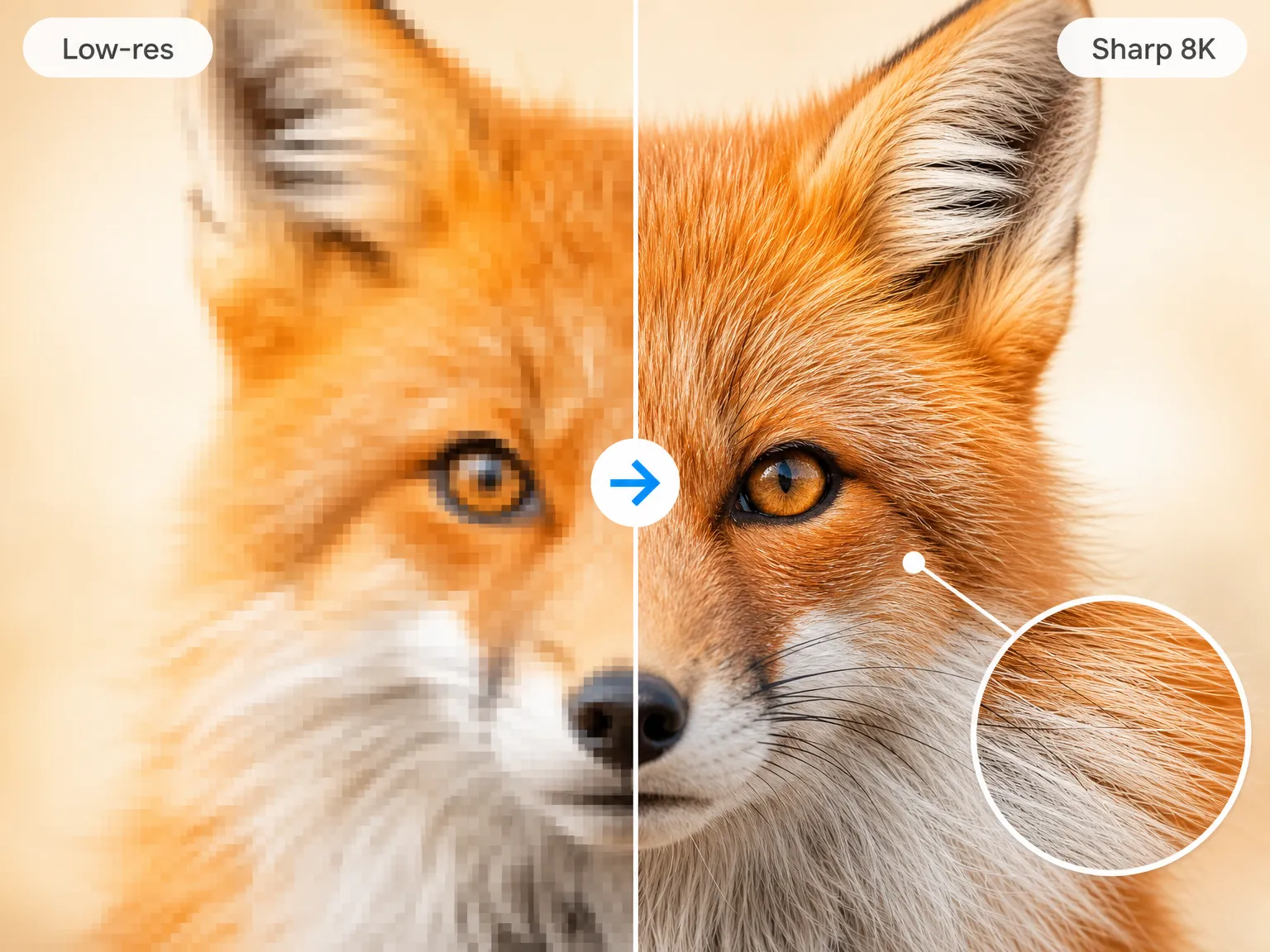
ImgEnhancer.app is a 4K upscale tool. A no-sign-up online upscaler that enlarges JPG, PNG and WebP images to tiers from 1K to 8K using AI super-resolution, with batch processing and watermark-free downloads. It suits sellers, designers, photographers and print shops that need sharper, larger files fast.

ImgEnhancer.app is a browser-based image upscaler built around a single promise: take a small or soft photo and return a larger, cleaner file within seconds. The workflow is deliberately narrow. A JPG, PNG or WebP is dragged into the page, a target tier is selected from 1K up through 2K, 4K and 8K, and the super-resolution model rebuilds edges and texture instead of stretching existing pixels. Results are previewed and then downloaded at full resolution with no watermark overlay. The tool is aimed at people whose images keep failing at output size rather than at input: marketplace sellers replacing old catalog shots, designers enlarging small logos and graphics for ads and slide decks, photographers preparing prints and display walls, real estate marketers filling brochures with listing photos, and print shops working from customer phone snapshots. Batch handling matters here, since a whole set can be queued at one resolution setting and exported file by file, which suits coordinated campaigns and listing folders better than one-at-a-time resizing. What separates it from general photo editors is the absence of an account wall. There is no login before the upload step and no sign up to download, so the tool behaves more like a single-purpose utility than a platform. That places it alongside standalone upscalers and the enlarge functions built into design suites, with the trade being speed and simplicity against the wider retouching, masking and format controls those suites carry. The engine focuses on recovering detail in low-quality sources, which helps with scanned or dated pictures as well as freshly captured but undersized files. Practical limits are worth noting before committing. Supported inputs are listed as common web formats only, output is chosen by tier rather than exact pixel dimensions, and the interface offers no controls for noise, faces or artistic style. There is also no public documentation of API access or third-party integrations. For straightforward enlargement work at speed, though, the three-step flow is short enough to fit into an existing production routine.

How do you use ImgEnhancer.app?

  1. 1Open the upscaler in your browser
    Load the site on desktop or mobile. There is no install and no sign up before you start.
  2. 2Add your images
    Drag in a JPG, PNG or WebP, or drop several files at once if you want to upscale a batch.
  3. 3Pick a target resolution
    Choose a tier between 1K and 8K to match your intended output, such as a screen, a listing or a print layout.
  4. 4Generate the upscaled result
    Run the AI upscaler and preview the sharper version before saving it.
  5. 5Download your files
    Save each high-resolution image at full size. Downloads carry no watermark and need no login.

Pros and cons

Pros

  • Upscales single files or whole batches to tiers from 1K up to 8KAI
  • No account, sign up or login required at any point in the flowAI
  • Downloads arrive at full resolution with no watermarkAI
  • Runs entirely in the browser on desktop and mobile with nothing to installAI
  • Accepts mixed batches of JPG, PNG and WebP filesAI

Cons

  • Resolution is chosen from preset tiers rather than exact pixel dimensions or aspect targetsAI
  • Only JPG, PNG and WebP are named as supported inputs, so TIFF, RAW and HEIC workflows are unaddressedAI
  • No manual controls for denoising, face recovery or sharpen strength, leaving AI judgement to the modelAI
  • Nothing on the site documents API access or connections to other design toolsAI
  • No published details on how uploaded images are stored or how long they are retainedAI

How much does ImgEnhancer.app cost?

Features

Resolution tiers from 1K through 2K, 4K and up to 8K; AI super-resolution that rebuilds edges and texture rather than stretching pixels; batch upscaling with one resolution setting for the whole queue; mixed JPG, PNG and WebP batches; full-resolution watermark-free downloads; browser operation on desktop and mobile with no install, sign up or login.

Frequently asked questions about ImgEnhancer.app

  • How do you use ImgEnhancer.app?
    The walkthrough on this page covers 5 steps: 1. Open the upscaler in your browser 2. Add your images 3. Pick a target resolution 4. Generate the upscaled result 5. Download your files.
  • What platforms does ImgEnhancer.app support?
    ImgEnhancer.app is available on Web App.
  • What are the limitations of ImgEnhancer.app?
    Resolution is chosen from preset tiers rather than exact pixel dimensions or aspect targets. Only JPG, PNG and WebP are named as supported inputs, so TIFF, RAW and HEIC workflows are unaddressed. No manual controls for denoising, face recovery or sharpen strength, leaving AI judgement to the model.

Status

StatusActive
Views0
Outbound clicks0
Added10/21/2026

Platforms

Web App

Pricing

Free