LTX 2.3 AI Video Generator

Text, image, and audio driven video generation with native audio

Beginner
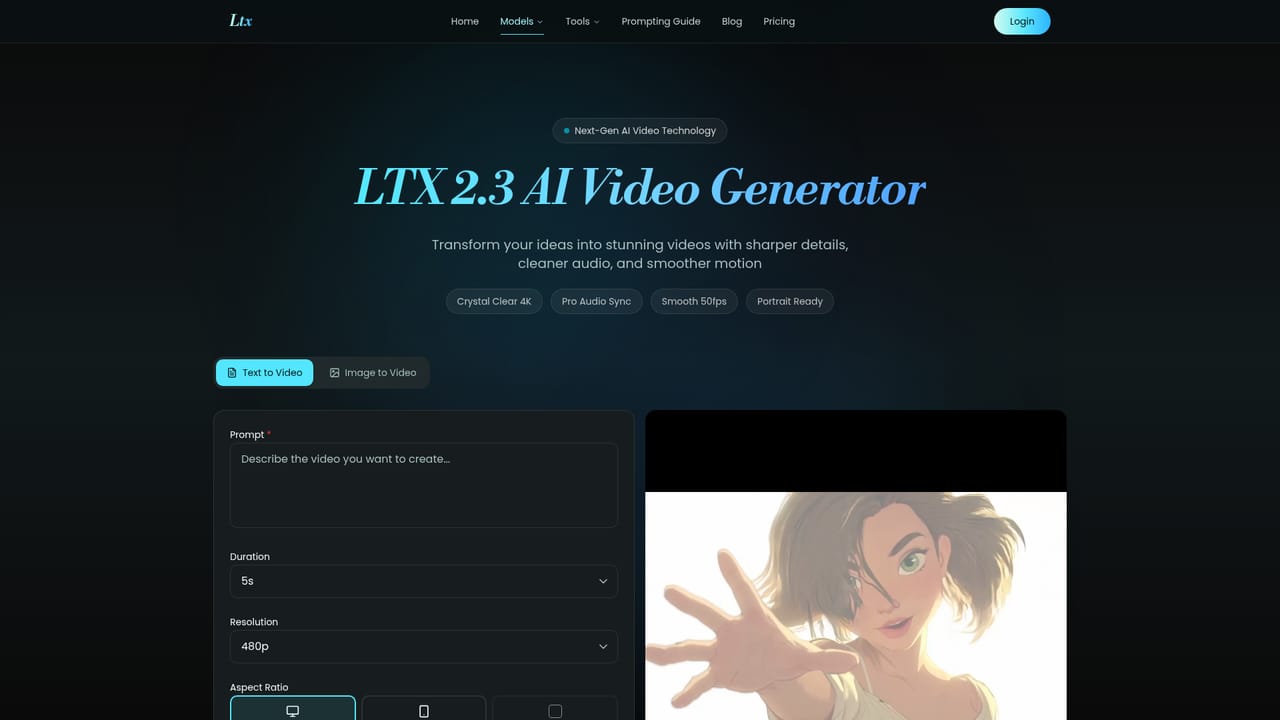
Screenshot of LTX 2.3 AI Video Generator, Text, image, and audio driven video generation with native audio

What is LTX 2.3 AI Video Generator?

LTX 2.3 AI Video Generator is an audio to video tool. The hosted LTX generator for text to video and image to video clips with native audio, sharp detail and portrait output, sold through one time credit packs with commercial rights and no subscription.

LTX 2.3 AI Video Generator is the live creation route inside the LTX ecosystem, a web based tool for producing short clips from a written description or a starting frame image. The homepage positions 2.3 as the generator users can open right now for text to video and image to video, while the newer 2.5 model is presented as the flagship story for higher fidelity and open deployment. In practice, 2.3 is the working product; 2.5 is the model most of the marketing and benchmarks describe. The tool is built around the settings a short form video workflow actually needs: prompt, resolution, duration, aspect ratio and generation mode. Output carries natural native audio and includes sharp detail plus native portrait framing, which suits social output and quick previews. The comparison table frames 2.3 as strong for single shot clips and workflow level iteration, with continuity handled by re-running and refining rather than by generating connected shots in one pass. Creators who only need a usable clip from a prompt or a still will find 2.3 the more direct route, since it is a finished product with task polling, generation history, download and sharing. Teams weighing a foundation model they can integrate, adapt or own should look at the 2.5 pages instead, where API, ComfyUI prototyping, local deployment and fine tuning are described. Credit packs are one time purchases with no subscription requirement, credits that do not expire, a 7 day money back guarantee and a commercial use license on every tier. Export resolution depends on plan, starting at 720p on the entry pack and moving to 1080p from the Basic tier upward. The paid tiers also differ on queue priority, concurrent jobs and bulk processing, so the choice is mostly about throughput rather than feature gating. Skill level sits at beginner for the hosted generator; the deeper model work, adapter chaining and deployment options live on the 2.5 side and assume more technical comfort.

How do you use LTX 2.3 AI Video Generator?

  1. 1Open the live generator
    Go to the LTX 2.3 page, which the homepage identifies as the creation route available now for text to video and image to video.
    LTX 2.3 AI Video Generator — Open the live generator
  2. 2Choose your generation mode
    Decide between text to video, where you describe the scene in a prompt, and image to video, where a starting frame anchors the shot.
  3. 3Set resolution, duration and aspect ratio
    Pick the output resolution your credit plan allows, then set clip length and aspect ratio; native portrait is supported for vertical formats.
  4. 4Generate and review the clip
    Run the job, wait for the queue to process it, then watch the result to check motion and detail before exporting.
  5. 5Download or share
    Export without a watermark if your plan includes it, or use the sharing options; past jobs stay available in your generation history.
  6. 6Compare against 2.5 before scaling up
    If quality, multishot continuity or 4K HDR matter for your brief, review the 2.5 model page before buying a larger credit pack.

Pros and cons

Pros

  • Live, ready to use web generator rather than a model page or benchmark demoAI
  • One time credit packs with no subscription, credits that never expire and a 7 day refund windowAI
  • Native audio generated alongside the clip, plus portrait framing for social formatsAI
  • Commercial use license included even on the cheapest $9.9 tierAI
  • Clear tier ladder for throughput: priority queues, up to 10 concurrent jobs and bulk processing higher upAI

Cons

  • Entry tier caps export at 720p, so 1080p delivery requires the $29.9 pack or aboveAI
  • Best described as single shot generation, with continuity handled by manual iteration rather than native multishotAI
  • API access is listed as coming soon, so product integration is not available on the hosted route yetAI
  • The site leads with the newer 2.5 model, so documentation and demos for 2.3 are thinner by comparisonAI
  • Credit consumption per clip is not stated on the homepage, making cost per finished video hard to estimate upfrontAI

How much does LTX 2.3 AI Video Generator cost?

Pricing

Four one time credit packs, no subscription: Starter $9.9 for 99 credits, Basic $29.9 for 330, Plus $49.9 for 600 and Professional $99.9 for 1250. Per credit cost drops from $0.090 to $0.079. Credits never expire, all tiers include a commercial license, and the 7 day money back guarantee applies.

Learn more

Support

Email support on the Starter and Basic tiers, with priority email on Basic and above, and 24/7 priority support on Professional.

Integrations

The 2.5 model is described as deployable through an API, ComfyUI for node based prototyping, local deployment and fine tuning; API access is listed as coming soon on the Professional plan.

Learn more

Features

Text to video and image to video generation with natural native audio, sharp detail, portrait output and downloads without a watermark. Users control prompt, resolution, duration, aspect ratio and generation mode, with task polling, generation history, download and sharing built in. The newer 2.5 model adds Diffusion Fidelity Rendering, native multishot continuity, improved prompt adherence, automatic duration, native 4K HDR and RAW oriented workflows.

Learn more

Frequently asked questions about LTX 2.3 AI Video Generator

  • How much does LTX 2.3 AI Video Generator cost?
    Four one time credit packs, no subscription: Starter $9.9 for 99 credits, Basic $29.9 for 330, Plus $49.9 for 600 and Professional $99.9 for 1250. Per credit cost drops from $0.090 to $0.079. Credits never expire, all tiers include a commercial license, and the 7 day money back guarantee applies.
  • How do you use LTX 2.3 AI Video Generator?
    The walkthrough on this page covers 6 steps: 1. Open the live generator 2. Choose your generation mode 3. Set resolution, duration and aspect ratio 4. Generate and review the clip 5. Download or share 6. Compare against 2.5 before scaling up.
  • What platforms does LTX 2.3 AI Video Generator support?
    LTX 2.3 AI Video Generator is available on Web App.
  • What does LTX 2.3 AI Video Generator integrate with?
    The 2.5 model is described as deployable through an API, ComfyUI for node based prototyping, local deployment and fine tuning; API access is listed as coming soon on the Professional plan.
  • What are the limitations of LTX 2.3 AI Video Generator?
    Entry tier caps export at 720p, so 1080p delivery requires the $29.9 pack or above. Best described as single shot generation, with continuity handled by manual iteration rather than native multishot. API access is listed as coming soon, so product integration is not available on the hosted route yet.

Status

StatusActive
Views0
Outbound clicks0
Added11/3/2026

Platforms

Web App

Pricing

Free TrialPaidSubscription