Free trial
The homepage states that new users receive free credits so they can test text-to-video, image-to-video and audio features before subscribing.
Learn moreText and image prompts turned into 4K cinematic clips with synced audio
Own Seedance 3.0 AI? Verify ownership to get a dofollow link

Seedance 3.0 AI generates 4K cinematic videos from text, images or audio in a browser, with character consistency across shots, native stereo audio and lip sync, plus prompt driven camera control. Credit based subscriptions include commercial rights.
Seedance 3.0 AI is a browser based video generator built around one promise: cinematic 4K clips produced from plain text or a single reference image. The prompt box is the primary interface. You describe a scene, optionally attach a photo, concept sketch or product mockup, then pick duration, aspect ratio and output quality before rendering. Camera moves such as zoom, pan, tilt, tracking and aerial shots are requested in the same prompt rather than through a timeline editor, which keeps the workflow short for people who do not cut video for a living. The feature that separates it from the crowd of short clip generators is multi-shot narrative consistency. A character lock option holds facial features, outfits and body proportions steady across different camera angles and scenes, so episodic content or a brand campaign can reuse one subject instead of regenerating a lookalike every time. Native audio generation runs in the same pass, producing stereo sound, foley, ambience and dialogue with phoneme level lip sync, which removes a separate dubbing or sound design step for talking head shots. A style library covers photorealism, anime, cinematic film, fantasy, cyberpunk and watercolor through natural language alone. In practice the tool suits marketers building product demos and ad prototypes, YouTube and social creators replacing stock footage, concept artists animating sketches, and small studios that need previz before a shoot. Renders typically land in 30 to 90 seconds for most 4K clips, and output is MP4 in landscape, vertical or square framing, so one prompt can serve a widescreen edit and a vertical feed cut. Against general purpose text-to-video models, Seedance 3.0 leans on resolution and continuity rather than on editing depth. It is not a replacement for an NLE, there is no project timeline, and everything runs through credits. Anyone weighing it should compare credit cost per finished minute against rival generators and check that the style range covers their niche before committing to a yearly plan.
The homepage states that new users receive free credits so they can test text-to-video, image-to-video and audio features before subscribing.
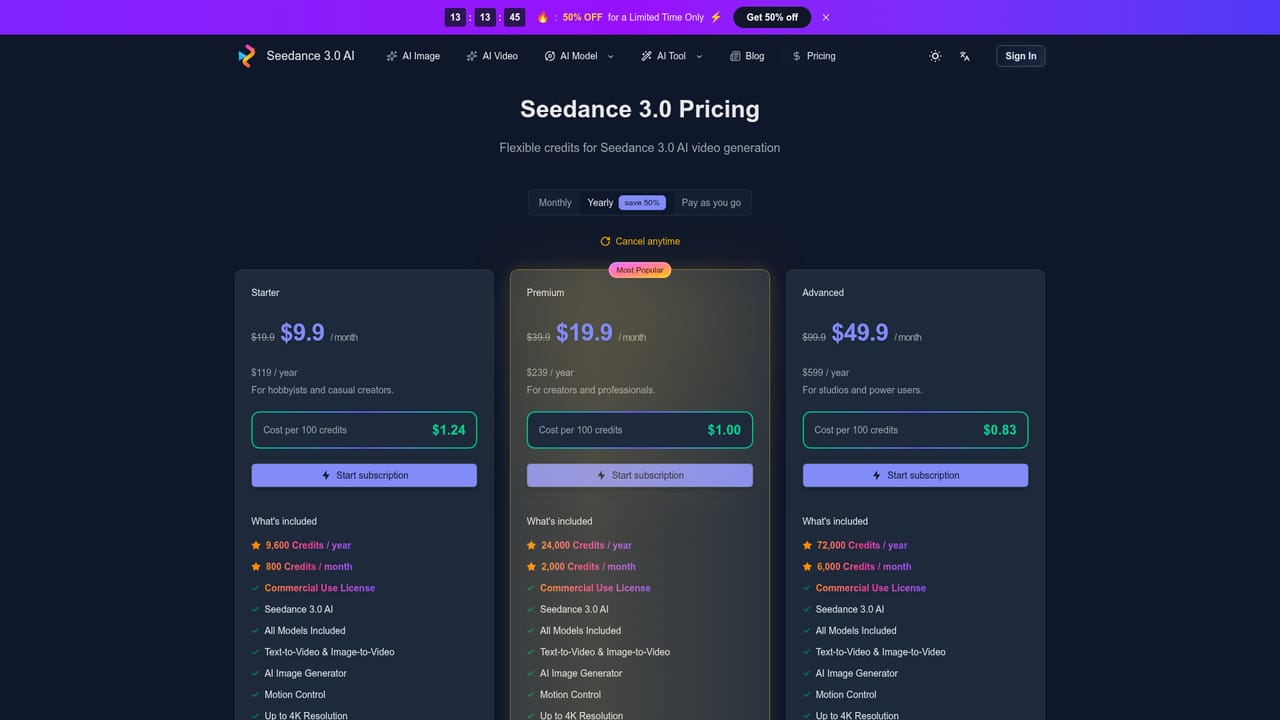
Learn moreYearly and monthly credit subscriptions: Starter at $9.9 per month billed yearly ($19.9 monthly) gives 800 credits a month, Premium at $19.9 ($39.9) gives 2,000, and Advanced at $49.9 ($99.9) gives 6,000. Cost per 100 credits drops from $1.24 to $1.00 to $0.83 across tiers. All plans include commercial rights, 4K output, no watermark and generation privacy.
Learn moreSupport is offered by email at support@seedance3ai.video, with priority support on Premium and expert team support on Advanced.
Text-to-video and image-to-video generation at up to 4K in MP4, with 16:9, 9:16 and 1:1 framing. Character lock holds faces, clothing and proportions across shots. Native stereo audio generation includes dialogue, foley and ambience with automatic lip sync. Prompt driven camera control covers zoom, pan, tilt, tracking and aerial moves, and a style library spans photorealism, anime, cinematic, fantasy, cyberpunk and watercolor. Renders typically take 30 to 90 seconds.
 AI Angels400+ customizable AI girlfriends for NSFW chat, voice calls, and roleplay
 Candy AIExperience the future of companionship with AI friends who chat, role-play, and connect with you on a human level.
 ourdream.aiA vast AI roleplay platform with millions of characters for chat, images, video and voiceAI Angels400+ customizable AI girlfriends for NSFW chat, voice calls, and roleplayCandy AIExperience the future of companionship with AI friends who chat, role-play, and connect with you on a human level.ourdream.aiA vast AI roleplay platform with millions of characters for chat, images, video and voice


