Free trial
The product itself is free and needs no trial: anonymous uploads up to 25 MB work immediately, and a free account adds larger files, history, AI summary, translation and chat.
Learn moreFree audio and video transcription with no account required

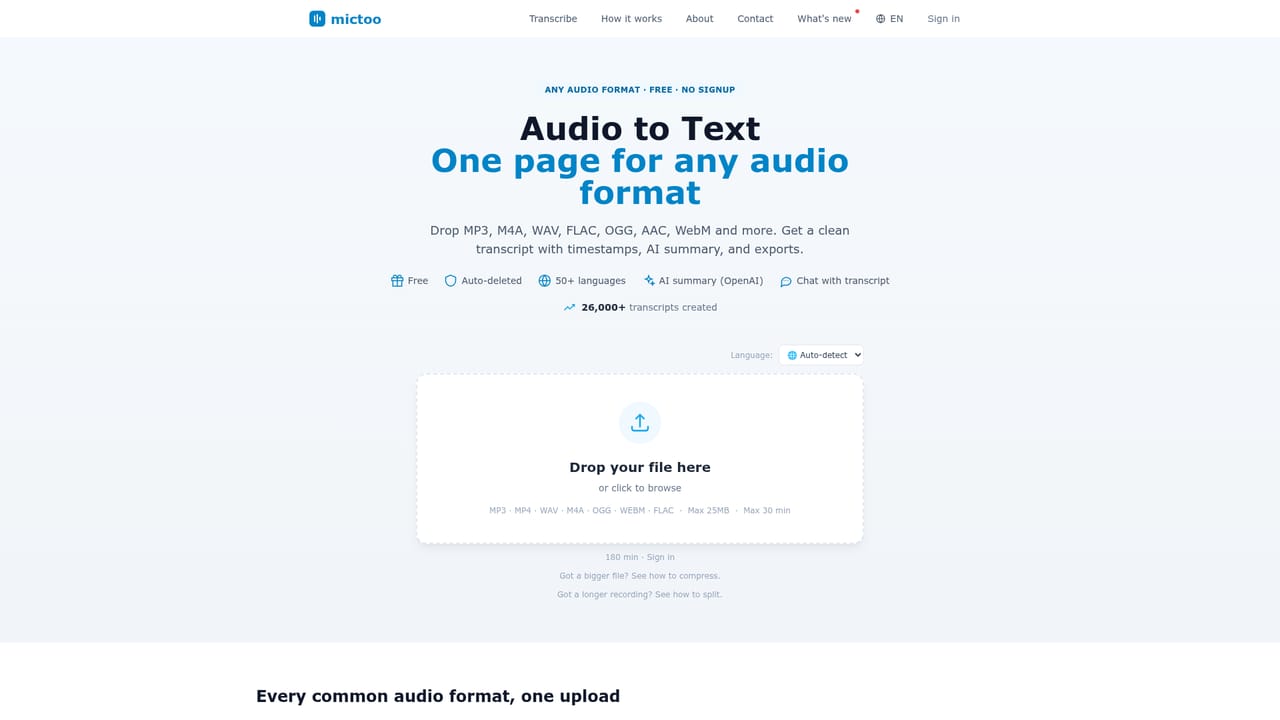
Mictoo transcribes audio and video to text in the browser using Whisper large-v3, with no signup for files up to 25 MB. Free accounts get larger files, daily history, AI summaries, translation and TXT, DOCX, PDF or SRT exports.
Mictoo is a browser-based transcription service that turns audio and video files into editable text without requiring an account. Drop an MP3, MP4, WAV, M4A, OGG, WEBM, FLAC, ACC, MOV or MPEG file onto the page and the site streams it to OpenAI's Whisper large-v3 model, served through Groq with OpenAI's API as an automatic fallback. That is the same speech recognition engine behind ChatGPT's voice features, and the site claims typical accuracy above 95% on clean recordings. Automatic punctuation is applied, and video files have their audio track extracted server-side before processing. Anonymous visitors can process files up to 25 MB and 30 minutes. A free sign-in raises the ceiling to 60 MB per file, and recordings up to 180 MB are split into chunks and reassembled into one transcript. Signed-in users also get 7 transcriptions per day, full history, AI summaries generated with OpenAI GPT-4o-mini, translation into 28 languages, and a chat mode for querying the transcript. Language detection is automatic across more than 50 languages, or it can be set manually in the upload form. Finished transcripts can be edited in the browser and exported as TXT, DOCX, PDF or SRT, which makes the tool useful for caption work as well as plain text. The audience is broad: students working through lectures, podcasters mining episodes for show notes, journalists checking quotes from interviews, teams documenting meetings, and creators who need subtitle files. The workflow is deliberately shallow, with no editor timeline or project management layer, so it competes on speed and cost rather than production features. According to the site, a 30-minute file typically finishes in about a minute. Speed is not guaranteed, however. Mictoo runs on a finite daily transcription budget, so when capacity runs out new uploads wait in a queue that shows position and estimated wait. Signing in does not bypass the queue. Files are not stored on Mictoo's servers, and neither provider trains on API audio.
The product itself is free and needs no trial: anonymous uploads up to 25 MB work immediately, and a free account adds larger files, history, AI summary, translation and chat.
Learn moreMictoo is free. Files up to 25 MB and 30 minutes are processed anonymously with no account or card. A free sign-in raises the per-file limit to 60 MB and the daily allowance to 7 transcriptions, with auto-splitting for files up to 180 MB. No paid tier is described on the homepage.
Learn moreNo support channels, help centre or contact method are described on the homepage; answers are limited to the on-page FAQ.
No third-party integrations are listed. Transcription runs through Groq's Whisper API with OpenAI's Whisper API as fallback, and summaries use OpenAI GPT-4o-mini.
Whisper large-v3 transcription for audio and video, automatic punctuation and language detection across 50+ languages, editable transcripts with timestamps, AI summaries via GPT-4o-mini, translation into 28 languages, chat with the transcript, and TXT, DOCX, PDF and SRT export.
 AI Angels400+ customizable AI girlfriends for NSFW chat, voice calls, and roleplay
 Candy AIExperience the future of companionship with AI friends who chat, role-play, and connect with you on a human level.
 ourdream.aiA vast AI roleplay platform with millions of characters for chat, images, video and voiceAI Angels400+ customizable AI girlfriends for NSFW chat, voice calls, and roleplayCandy AIExperience the future of companionship with AI friends who chat, role-play, and connect with you on a human level.ourdream.aiA vast AI roleplay platform with millions of characters for chat, images, video and voice


