Free trial
No paid trial is listed, but a free tier lets users process one short video (up to 15 seconds) per day without signup or a credit card.
Learn moreAI tool that erases burned-in video subtitles without cropping, blurring, or re-editing

RemoveSubtitles is an AI web tool that strips hardcoded captions from video without cropping or blurring, preserving original framing, resolution, and audio, aimed at creators and localization teams reusing already-subtitled footage.
RemoveSubtitles is a web based tool that erases hardcoded, burned-in subtitles from video footage. Unlike a traditional editor, it does not crop the frame or paste a blur or black bar over the caption area. Instead it reconstructs the pixels underneath the subtitle text, keeping the original resolution, aspect ratio, frame rate, and audio timing intact. Users either let the system automatically detect the subtitle region or mark it manually when captions sit in an unusual spot, then preview the repaired clip before committing to a full download. The tool targets anyone who needs to reuse footage that already has captions baked into the image, including video creators, marketing teams, course creators, and localization specialists who need a clean base layer before adding translated subtitles. A common scenario is rescuing a finished ad, lesson, or short-form export (TikTok, Reels, Shorts, CapCut) when the original editing project is gone and only the subtitled export remains. Because the subtitle removal is isolated from a full timeline rebuild, it works as a quick fix rather than a replacement for a video editor. In practice, the workflow has three steps: upload an MP4, MOV, or WebM file, detect or adjust the subtitle zone, then review and download the repaired result. Processing is credit based, with 1 credit covering roughly 15 seconds of video and a cap of 15 minutes per video. A free tier allows one short video per day without signup, while paid plans unlock downloads at higher volume and priority processing. Among alternatives, most subtitle removal is handled manually inside general purpose video editors through cropping, blurring, or masking, which alters framing or looks visibly patched. RemoveSubtitles positions itself as a narrower, faster path for this one task, trading the flexibility of a full editor for a focused repair workflow with a preview step before any credits are spent on a full export.

No paid trial is listed, but a free tier lets users process one short video (up to 15 seconds) per day without signup or a credit card.
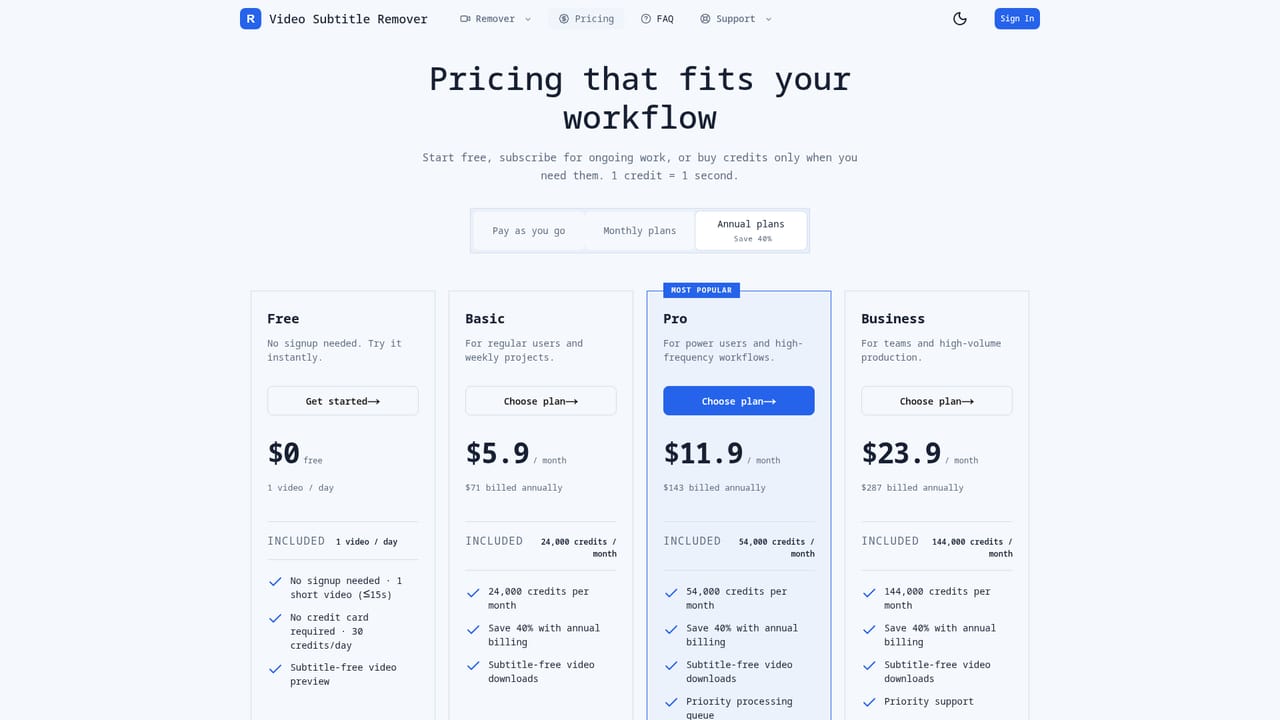
Learn moreFreemium model: Free plan offers 1 short video a day (30 credits/day, no signup). Paid plans start at Basic $5.9/month (24,000 credits), Pro $11.9/month (54,000 credits), and Business $23.9/month (144,000 credits), with annual billing saving 40%. 1 credit equals 1 second of processing.
Learn moreSupport is available through a dedicated contact page, alongside an FAQ section covering formats, quality, and workflow questions.
Learn moreAI detection or manual marking of subtitle zones, repair without cropping or blur, preserved audio/timing/resolution, preview before download, support for videos up to 15 minutes, and compatibility with hardcoded exports from TikTok, CapCut, Reels, and Shorts.
 AI Angels400+ customizable AI girlfriends for NSFW chat, voice calls, and roleplay
 Candy AIExperience the future of companionship with AI friends who chat, role-play, and connect with you on a human level.
 ourdream.aiA vast AI roleplay platform with millions of characters for chat, images, video and voiceAI Angels400+ customizable AI girlfriends for NSFW chat, voice calls, and roleplayCandy AIExperience the future of companionship with AI friends who chat, role-play, and connect with you on a human level.ourdream.aiA vast AI roleplay platform with millions of characters for chat, images, video and voice


