What these tools do
A graph explainer does the translation step between a raw input and a visual a reader can absorb. Depending on the tool, that input is a spreadsheet, a paragraph of text, or a link to a page. The output is a chart, an infographic, or a network of connected concepts, often with an explanation attached. These tools replace the manual loop of opening a spreadsheet, choosing a chart type, formatting axes and writing the caption, or the whiteboard session spent mapping entities in a document. They suit analysts producing recurring reports, students explaining findings, and small teams that need credible visuals without a designer or a data engineer.
How to choose one
Start with the shape of your input. If you already have tabular numbers and want a chart, look for a tool that accepts uploads and picks a sensible chart type for you. If your material is prose or a web page and the relationship between ideas is the point, a knowledge graph tool fits better than a charting one. Then check the output format: a single chart, a shareable infographic page, or an exportable graph differ in how much editing you get after generation and where the result can live.
Consider how much explanation you need alongside the visual. Some tools answer a question in text and pair it with a plot, which suits readers who need the interpretation as much as the picture. Others hand over a clean asset and leave the writing to you. Finally, weigh where you will run it. Browser based tools travel well between machines; desktop and mobile apps matter if the work happens away from a laptop. Check the pricing tier against how often you will use it, since several of these tools are free or freemium and a paid plan only pays off with regular output.
Notable tools
ChartGPT is a ChatGPT based tool that takes uploaded data and returns the chart it judges most appropriate, which shortens the back and forth of choosing a visualisation. It runs on the web plus iOS, Android, MacOS and Windows, and uses a freemium model.
Infogram targets data heavy teams that need infographics rather than single charts, with AI assistance in the creation process. It is a web app on a freemium plan and is aimed at groups producing visual reports at volume.
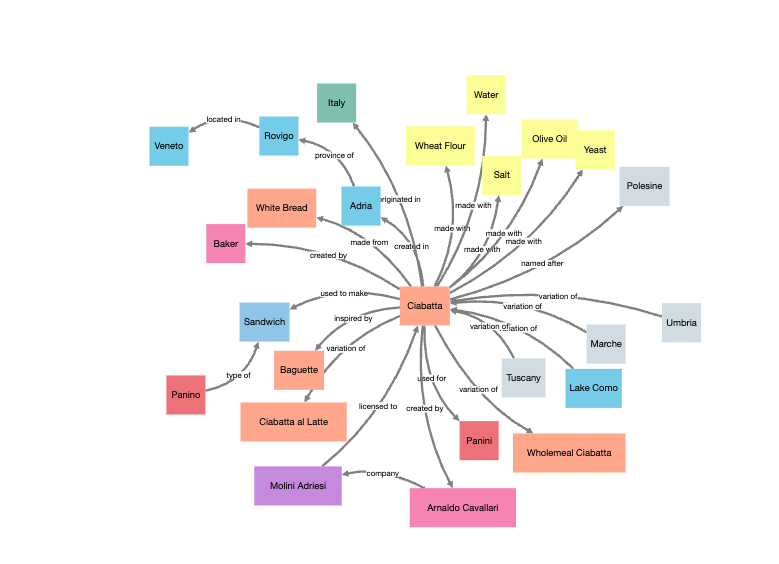
InstaGraph converts text or URLs into visual knowledge graphs, useful when the relationships between entities matter more than quantities. It is free and runs in the browser, which makes it a low risk way to test whether a graph view explains your source better than a summary.
Common questions
What is a graph explainer?
A graph explainer is a tool that turns an input (data, text, or a link) into a visual representation and helps a reader understand it. The visual may be a conventional chart, an infographic, or a node and edge graph of connected concepts. The common thread is that the tool handles the mapping from source to picture.
Can a graph explainer work from text instead of numbers?
Yes, but only with the right tool. InstaGraph accepts text or URLs and produces a knowledge graph, so the thing being explained is how entities relate. Chart oriented tools such as ChartGPT expect data to plot, so passing prose to them is the wrong fit. Match the tool to the input before expecting good output.
Do I need a paid plan?
Not to start. All three tools here offer a free or freemium entry point, which is enough to test whether the generated visual explains your material. Paid tiers tend to matter when output volume, team collaboration, or presentation ready assets become routine rather than occasional.
When to look elsewhere
If the job is finding structure in data rather than presenting it, the Pattern Recognition category under this hub is the closer match. If the visual you need is an economic chart built to illustrate a relationship between variables, try Economics Graph Maker instead.